
If you run an online store in Israel, most of your orders come from private customers and never touch allocation numbers. It takes one large order from a business, or one large invoice from a supplier, for the subject to turn into real money. The allocation number is the core of the Israel Tax Authority's Israel Invoice model, and the threshold at which it applies has come down in stages since 2024. This article explains what an Israel Invoice allocation number does, the threshold that applies today, how you get one, and what to check on the invoices your suppliers send you. Everything here is correct as of September 28, 2026, and based on the Tax Authority's website.
What is an Israel Invoice allocation number?
An allocation number is an identifier the Israel Tax Authority assigns to a specific tax invoice, at the request of the business issuing it. The number is printed on the invoice, and it lets the Tax Authority know the invoice was reported to it before the buyer deducts the VAT on it.
Why the Tax Authority requires it
The logic is simple:
- A business that receives a tax invoice offsets its VAT against the VAT it charges its own customers; that is called deducting input VAT.
- Fictitious invoices, for sales that never happened, let a business deduct VAT that nobody paid.
- According to the Tax Authority, the model's purpose is to stop those invoices from circulating.
So the rule is: on an invoice above the threshold, no allocation number means no deduction. Two things follow:
- The issuer carries the duty: they request the number.
- The buyer pays the price: when the number is missing, the business buyer cannot deduct the VAT.
That is why business customers insist on it, and why you should insist on it on the invoices you receive.
The allocation number threshold
The threshold is measured on the invoice amount before VAT, and the number is needed when the amount exceeds it. According to the Tax Authority, the threshold has come down like this:
| From | Threshold, before VAT |
|---|---|
| May 5, 2024 | NIS 25,000 |
| January 1, 2025 | NIS 20,000 |
| January 1, 2026 | NIS 10,000 |
| June 1, 2026 | NIS 5,000 |
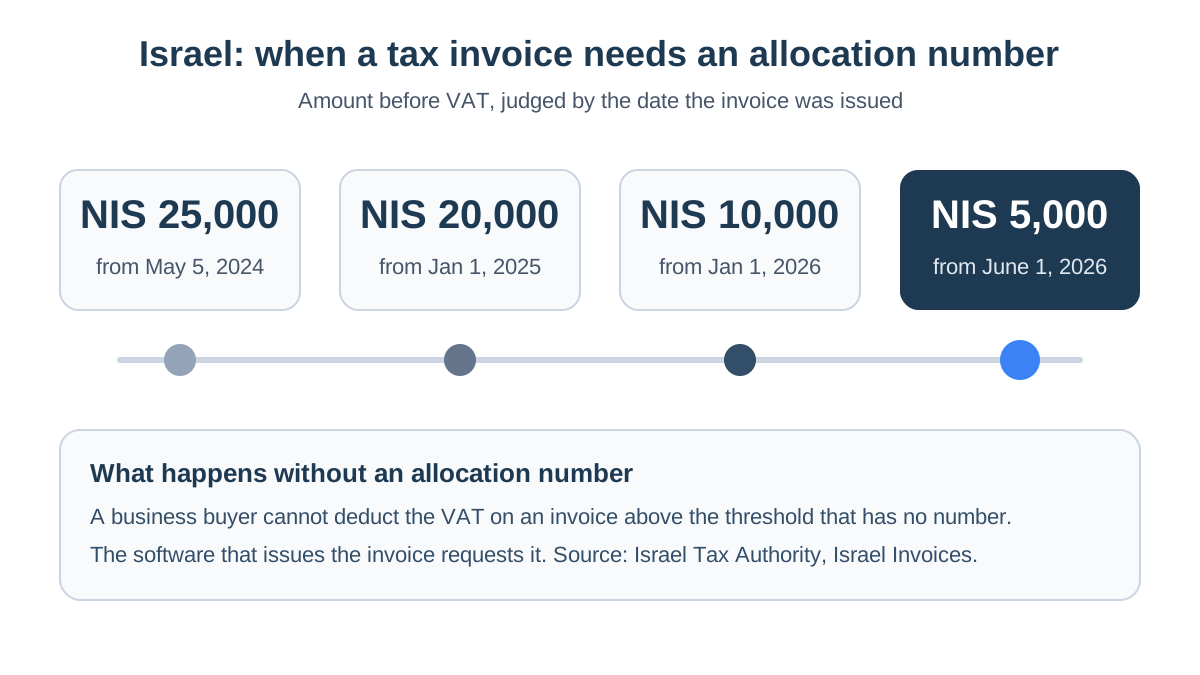
These figures are correct as of September 28, 2026. The source, in Hebrew, is the Tax Authority page everything businesses need to know about Israel Invoices. The Tax Authority updates the model from time to time, so before a large deal it is worth also reading the Israel Invoice questions and answers on gov.il and speaking to your accountant.
Remember that the threshold is measured before VAT:
- NIS 5,500 including VAT: below the threshold, because the amount before VAT is under NIS 5,000.
- NIS 6,000 before VAT: already above it.
How to get an allocation number
In most businesses the number is requested by the invoicing software, not by a person:
- The first time, the business connects to the allocation services and authorizes its software to act on its behalf, following the steps the Tax Authority lists on its site.
- You issue a tax invoice to a business for an amount above the threshold.
- The software calls the Tax Authority's service and receives the number.
- The number is printed on the document.
Businesses that use a paper invoice book, or software that is not connected to the service, can request an allocation number online through the Tax Authority's service for requesting an allocation number for a tax invoice. The service can be used by the business itself or by someone it has authorized, such as its accountant.
For an online store, the practical route is invoicing software connected both to the store and to the allocation services. That way, an order from a business customer gets an invoice with a number without anyone having to remember to ask. Our guide to accounting software for online stores covers what else to check when you choose one.
Allocation numbers for online stores
Most orders on a store are from private customers, and they need no number. The question comes up in two situations: when a business buys from you, and when you buy from suppliers.
Selling to a business buyer
A company ordering staff gifts, an office buying equipment, or a shop buying from you wholesale. If the amount before VAT exceeds the threshold, the customer will expect an invoice with an allocation number. For that to work, check three things:
- Business fields at checkout. The customer needs a way to enter a company name and VAT number, and those details need to reach the invoice. Without the buyer's VAT number, there is nothing to request a number for.
- The link between store and software. Make sure the plugin for WooCommerce, or the Shopify app, passes the business details on, and that the software requests the number automatically.
- Orders closed outside the store. A large order agreed on the phone and paid by bank transfer needs an invoice exactly like a web order.
Buying from suppliers
This is where most of a small store's money sits. A supplier that invoices you above the threshold needs to include an allocation number, or you cannot deduct the VAT. That covers, for example:
- A stock supplier.
- A printer.
- A shipping carrier.
Checking allocation numbers on supplier invoices
The common mistake is discovering an invoice without a number only when the accountant prepares the VAT return. By then the supplier has been paid and is not always quick to fix it. It is better to check every large invoice when it arrives:
- Is the amount before VAT above the threshold? If not, no number is needed.
- Is there an allocation number on it? If not, ask the supplier for a corrected invoice before you pay.
- Is the number valid? You can verify a supplier's invoice details by allocation number in the Tax Authority's verification service.
To check invoices, you first need them in one place. StoreChart's expenses module helps with that part:
- Collect: it connects to a Gmail inbox and gathers supplier invoices from it.
- Read: AI reads the vendor, amount, VAT and date from each one.
- One list: you see which large invoices came in this month.
Be clear on the limits: StoreChart does not read, verify or request allocation numbers. You or your accountant do the check itself, and you issue your own tax invoices in your accounting software.
A monthly routine that includes this check, together with everything else your accountant needs, is in online store bookkeeping. To see how the Tax Authority receives a business's full set of books at once, read about the open format.
Common mistakes with allocation numbers
- Measuring the threshold including VAT. The threshold is before VAT. Checking the final total can make an invoice look below the threshold when it is above it, or the reverse.
- Relying on an old guide. The threshold has come down three times since May 2024. An article from 2024 quoting NIS 25,000 is out of date, so always check the date of your source.
- Assuming a consumer store is exempt from the subject. Even a store selling mostly to private customers gets the occasional large business order, and almost always gets large supplier invoices.
- Paying before checking. Once you have paid, it is harder to get a corrected invoice. A two-minute check before the transfer protects the VAT.
- Forgetting phone orders. An order that did not go through the store's checkout does not trigger the automatic connection, so its invoice needs handling by hand in your software.
Key takeaways
- An allocation number is the Israel Tax Authority's approval on a tax invoice; without it, a business buyer cannot deduct VAT on an invoice above the threshold.
- From June 1, 2026, the threshold is NIS 5,000 before VAT, according to the Tax Authority, as of September 28, 2026.
- Your invoicing software requests the number; businesses using a paper book can request it on the Tax Authority's website.
- For an online store, it affects large orders from businesses and the invoices your suppliers send you.
- StoreChart does not request allocation numbers, but it collects supplier invoices into one place so you can check them in time.
Frequently asked questions
Does every Israeli invoice need an allocation number?
No. The number matters for tax invoices a business receives and wants to deduct VAT on, when the amount before VAT exceeds the threshold. Private consumers do not deduct VAT, so their orders do not need one. An invoice to a business below the threshold does not need one either.
What if a large supplier invoice arrives without an allocation number?
Contact the supplier straight away and ask for an invoice with an allocation number. Even a supplier using a paper invoice book, or software that is not connected to the service, can request a number on the Tax Authority's website. Until there is a number, the VAT on that invoice cannot be deducted, so deal with it before the invoice reaches your accountant.
Does this apply if I sell from outside Israel?
The model applies to Israeli tax invoices, issued by businesses registered for VAT in Israel. If you are not registered in Israel, it is unlikely to apply to your own sales, but an Israeli business customer may ask about it. Check your position with an accountant who knows Israeli VAT.
Does StoreChart request allocation numbers?
No. StoreChart does not issue tax invoices and does not request allocation numbers. Your invoicing or accounting software does that. StoreChart collects supplier invoices from Gmail into one list, so it is easier to review the large ones before they go to your accountant.
How do I check that an allocation number is genuine?
The Tax Authority runs an online service for verifying a supplier's invoice details by its allocation number. If the details do not match, or the number is not found, go back to the supplier before you pay or pass the invoice to your accountant.