
Most store owners are not afraid of the tax filing itself but of the week before it: hunting for invoices across three inboxes, guessing which payout belongs to which orders, and finding out that a refund from last month never got a credit note. Online store bookkeeping does not have to look like that. With a short, fixed weekly routine, the end of the month becomes sending a ready package to your accountant, and you always know what the store actually earns. This article sets out that routine: what to collect, what to check each week, how to match money in to orders out, and what your accountant needs from you every month.
The three parts of online store bookkeeping
All the money in a store moves along one of three tracks, and each has its own paperwork:
- Income. Every paid order needs an invoice, receipt or invoice-receipt, depending on the rules where you are registered. Every refund needs a credit note. Your invoicing software issues these, ideally automatically through its connection to the store.
- Expenses. Stock, shipping, advertising, software subscriptions, packaging and fees. Every expense needs an invoice from the supplier, and in countries with VAT it is also the only way to reclaim the tax on it.
- Money movements. Payouts from your payment provider and PayPal, and transfers to suppliers. These are not accounting documents, but they are the proof that the documents are right.
The mess starts when one track is not tied to the others. An invoice went out but the money never arrived, a payout came in with no orders behind it, or an expense was paid with no invoice. The routine below is designed to catch those gaps early.
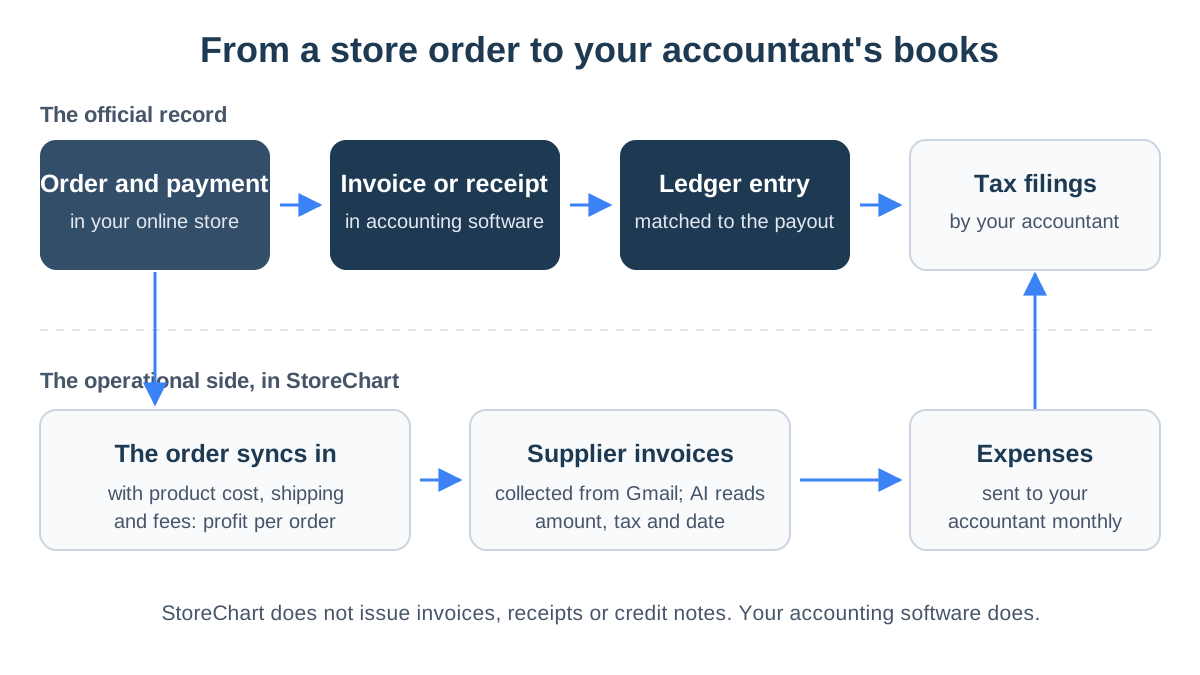
Notice the split in the diagram:
- The top row: the official record, which lives entirely in your accounting software and with your accountant.
- The bottom row: the operational side, which helps you know what is happening in the store and hand over complete, tidy material.
Our guide to accounting software for online stores explains how to choose the software that issues the documents.
The weekly bookkeeping check
Once a week, on the same day, go through four questions:
- Does every paid order have a document? Compare the number of paid orders in the store with the number of invoices issued in your software. A gap means the connection failed or an order was closed outside the store.
- Does every refund have a credit note? Refunds are where connections break most often, especially a partial refund of one item out of several.
- Were all of this week's supplier invoices collected? An invoice not saved now will vanish into your inbox until the end of the quarter.
- Is there a large supplier invoice? In Israel, if the amount before VAT is above the Israel Invoice threshold, check it carries an allocation number. The details are in Israel Invoice allocation numbers explained.
When the connections are automatic, this check is mostly a hunt for exceptions rather than manual work on every order.
How to match payouts to orders
This is the part that confuses store owners most. A customer paid $30, but a different amount reached the bank, on a different day, together with dozens of other orders.
The reason is that your payment provider batches payments, deducts its fee and pays out on its own schedule. Your income is the full amount of the invoices you issued, and the fee is a separate expense.
So do not record the payout as income. Instead:
- Download the payout report from your payment provider and from PayPal at the end of each month.
- Compare it with the orders paid in the same period. The difference should come down to fees, refunds and payments not yet paid out.
- Keep the fee invoice or statement. Most payment providers issue a monthly statement of fees, and that is an expense like any other.
Exporting the order list to a file makes the comparison easier. In StoreChart you can filter orders by date and export them to a CSV file that opens in Excel, then put it next to the payout report.
Collecting expense invoices
In a small store, most of the money lost in bookkeeping is expenses that were never recorded:
- A shipping carrier's invoice left in an inbox.
- A software subscription that renews every month.
- An ad invoice that went to a different address.
Each one is a deductible expense, and possibly tax you never reclaimed. The simple fix is to send all supplier invoices to one inbox and stop relying on memory. This is how StoreChart's expenses module handles it:
- Connect: it links to a Gmail inbox with read-only access.
- Collect: it gathers invoices on a schedule you set.
- Read: AI reads the vendor, amount, tax and date from each invoice.
- Sort: it categorizes the expense and skips invoices it already collected.
- Send: on the day of the month you choose, the expenses go to your accountant.
Profit per order
Your accountant's reports answer how much the business made in a year. They do not answer which products earn and which lose money after shipping and fees. For that you need three figures on every order:
- Cost of goods sold for the items.
- Shipping cost as actually paid.
- Fees from the payment provider and platform.
StoreChart's profitability report does that calculation for each order, from the orders your store sends in. It does not replace your accountant's reports, but it shows, as it happens, a product that sells a lot and earns little. The difference between an operations system and accounting software is covered in our guide to business management software.
What your accountant needs every month
At the start of each month, send your accountant the same package:
- The documents you issued: invoices, receipts and credit notes. Most software lets you give them direct access instead of sending files.
- Every expense invoice for the month, including overseas suppliers and ad platforms.
- Payout reports from your payment providers and PayPal.
- The business bank statements.
When the package arrives in the same shape every month, the filing takes less time and fewer questions. At year end, more items join the list, such as a stock count if your accountant asks for one, so ask early what they will need.
Bookkeeping for several stores
If you sell on several sites, or online and in a physical shop, the first question is which business each sale belongs to:
- One business: several sites issue documents in the same series and go into the same books.
- Separate companies: they need separate books, separate invoicing and sometimes a separate accountant.
- Your operations system: it can show all your stores together, but in the books they must never be mixed.
Common online store bookkeeping mistakes
- Recording payouts as income. The payout is already net of fees and refunds, so it understates income and hides the fee as an expense.
- Leaving invoice collection to the end of the quarter. The longer you wait, the more invoices go missing and the more suppliers you have to ask for copies.
- One bank account for home and business. Every personal purchase in the business account is a line your accountant has to ask about.
- Refunding without a credit note. The money went back to the customer, but the books still show the sale, and you pay tax on it.
- Waiting for the annual accounts to see profit. They arrive too late to fix the price of a product that loses money. Profit per order shows it this month.
Key takeaways
- Online store bookkeeping rests on three tracks: a document for every order, an invoice for every expense and matched payouts.
- A short weekly check for exceptions saves the hard week before the tax filing.
- A payout from your payment provider is not your income. Income is the total of your invoices, and the fee is an expense.
- Uncollected expenses are the easiest money to lose in a small store.
- StoreChart does not keep your books, but it collects supplier invoices, works out profit per order and exports orders to a file.
Frequently asked questions
Can I do the bookkeeping for a small store myself?
You can and should run the routine yourself: making sure every order has a document, collecting invoices and matching payouts. Leave tax filings, how expenses are classified and the year-end accounts to an accountant or tax adviser. They know what is deductible and how to record unusual transactions.
How much time does it take each week?
It depends on how many orders you have and how much is automated. When invoices go out from the store automatically and supplier invoices are collected from email, the weekly check is mostly about exceptions: a refund without a credit note, a payout that does not match, or a missing supplier invoice.
Does StoreChart do my store's bookkeeping?
No. StoreChart does not issue invoices, receipts or credit notes, and does not prepare tax filings. You issue those documents in your accounting software. StoreChart collects supplier invoices from Gmail, works out profit per order and exports orders and customers to a CSV file, so you and your accountant have tidy material to work from.
What about invoices from overseas suppliers?
Keep them exactly as you keep domestic invoices, even when they are in another language or currency. Invoices from ad platforms, overseas stock suppliers and software services often carry different tax treatment, and your accountant knows how to record them. Without the document, they cannot record the expense at all.