
Ecommerce operations platform for online stores and teams
Commerce for operations and margins, Communication for team WhatsApp, CRM for leads and tasks, and Bubble for AI website chat. All working on shared data.
In short
StoreChart is an ecommerce operations platform that connects multiple sales channels, online stores, and customer touchpoints into one central account. It coordinates orders, inventory, customers, and profit per sale, alongside a shared WhatsApp Business inbox, lead and task management, and an on-site AI assistant. Every business activates only the tools they need.
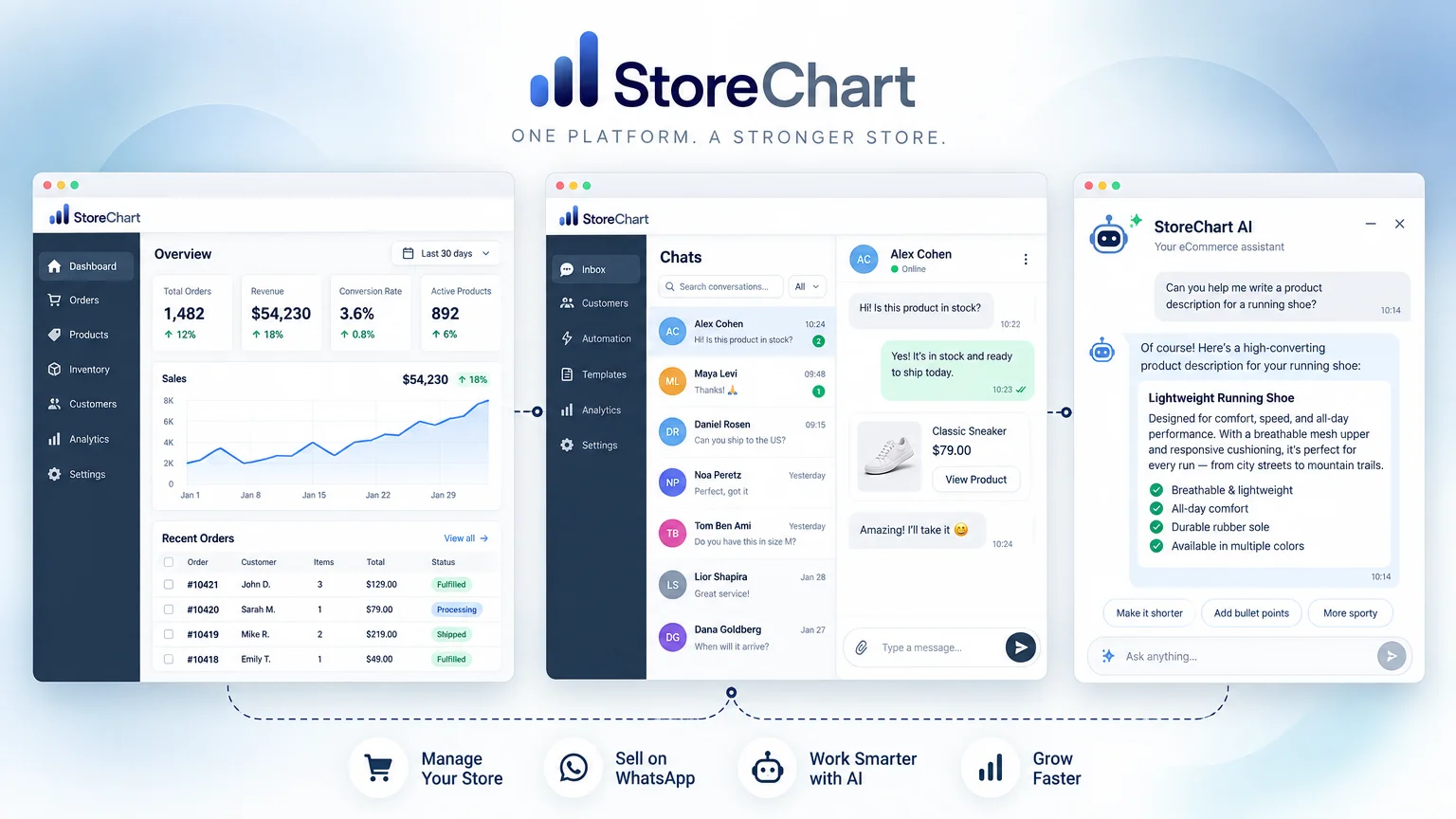
One business management system across four core pillars
Each module specializes in its domain, while sharing unified customer records, orders, and logs
How to get started
Three steps from an empty account to day-to-day work
Connect one WooCommerce or Shopify store, or several, and their orders, customers and products come into StoreChart.
Choose which hubs to turn on, operations, WhatsApp, leads and tasks or a website AI chat, and invite your team with role-based permissions.
A new order updates the customer profile and the dashboards and can trigger an automatic WhatsApp message. A won lead becomes a customer or an order.
Business management system: how the hubs connect
One order across the system
When an order comes in from one of your stores, it updates several places at once:
- Orders list: with product cost, shipping, fees and what's left.
- Customer profile: the order joins the purchase history.
- Dashboards: update per store and in total.
- WhatsApp: if you set up an automation for an order event, the customer gets a message from the store's number.
Lead management: from inquiry to customer
- Sources: a website form, a webhook or manual entry.
- Status board: each lead arrives with its source and estimated value.
- Automations: a WhatsApp message when a lead is created or its status changes.
- Conversion: a won lead becomes a customer or an order and carries on in the same record, instead of starting over in another system.
Team permissions by role
Each team member gets a role with its own permissions:
- Shipping: whoever packs orders doesn't have to see profit.
- WhatsApp: whoever answers customers doesn't need access to store settings.
- Hubs: turn on only what the business needs and add team members as you go.
What isn't included
- Store platform: StoreChart doesn't replace it. Your site and checkout stay on WooCommerce or Shopify.
- Stock: levels are not pushed back to the stores.
- Accounting: invoicing isn't part of the product today. Supplier invoices can be collected from Gmail for expense tracking.
- App: StoreChart is a web app (PWA), not an app-store download.
Why StoreChart?
Several stores in one account
WooCommerce and Shopify stores connect to the same account, with one orders list and dashboards that compare them.
Hebrew right-to-left, and English too
The interface runs in right-to-left Hebrew with Israeli date and amount formats, and has a full English version.
AI content translation
Translate the product content in the CMS into other languages with AI, without copying text by hand.
Make.com automation
A Make.com connection, an API, and inbound webhooks so external systems can send orders and leads into StoreChart.
Channels for partners and wholesale
Sales channels for ambassadors, partners and wholesale buyers, each with its own storefront, in the same account.
Integrations with the tools you already use




Guides and resources
Practical guides on store management, inventory, WhatsApp Business and profitability.
Guides
- Israel Invoice allocation numbers explainedAn Israel Invoice allocation number is the Tax Authority's approval on a tax invoice to a business. The current threshold, how to get one and what to check.
- Profit and loss statement for online stores, explainedA profit and loss statement for online stores: what it contains, how to build one, a worked example, gross versus operating profit and how to read it.
- Small business management software: what you need now and what can waitSmall business management software for teams of one to ten: what to start with, what to postpone, daily workflows, when a free plan is enough, and mistakes.
- Multi-warehouse inventory management: practices, KPIs and when you need a WMSMulti-warehouse inventory management explained: receiving, put-away, picking, cycle counts, transfers, safety stock and KPIs, and when you need a WMS.
- WhatsApp chatbot: types, setup and when an AI agent makes senseWhat a WhatsApp chatbot is, the three main types, what you need to build one, the Meta rules it must follow, and how an AI agent answers from your knowledge.
- Lead management: sources, statuses and follow-up until the saleWhat lead management is, where leads come from and how to get them into one system, how to design statuses that fit your business, and how to measure it.
From the blog
- Payment Page for Business: The Complete GuideA payment page for business lets customers pay by link, in installments if you allow them. See how to build one in StoreChart, share it and track every payment.
- Make.com Ecommerce Automation: Sending Orders and Leads Into StoreChartMake.com ecommerce automation for StoreChart: post orders and leads from forms, sheets and other apps into StoreChart by webhook, and let WhatsApp rules follow.
- Monthly expense tracker: manage recurring costs by monthA monthly expense tracker for online stores: list recurring costs once, see which invoices are missing each month and send them to your accountant on a set day.
- Small Business CRM: What an Online Store Really NeedsA small business CRM should be simple: customers, leads and tasks in one place. See what to set up first, what to skip and how StoreChart handles each part.
Glossary
- What Is OMS? Order Management Systems ExplainedWhat is an OMS? How an order management system collects orders from every channel, tracks status and stock, and when a growing online store needs one.
- What Is Gross Profit? Formula and Example for Online StoresWhat is gross profit? The formula, what belongs in the cost of sales and what does not, gross versus operating profit, a worked example and common mistakes.
- What Is ROAS? Return on Ad Spend Formula and Break-EvenWhat is ROAS? How to calculate return on ad spend, find your break-even ROAS from gross margin, and see why a high ROAS can still lose a store money.
- What Is SKU (Stock Keeping Unit)? Naming and ExamplesWhat is a SKU (stock keeping unit)? How SKU codes identify each product variant, how to design a naming scheme, and the mistakes that corrupt stock data.
Platform FAQ
Do I have to turn on every hub?
No. Turn on only what your business needs, for example just operations or just WhatsApp, and add hubs later. Customer and order data is shared across whatever you turn on.
Can I connect several stores to one account?
Yes. WooCommerce and Shopify stores connect to the same account, with one orders list and dashboards that compare them. How many stores you can connect depends on your plan; the pricing page has the details.
Does StoreChart replace WooCommerce or Shopify?
No. Your store keeps running as it does, and StoreChart pulls its orders, customers and products so you can manage them in one place. Stock levels are not pushed back to the store.
Is there a mobile app?
StoreChart is a web app (PWA): open it in your phone's browser and add it to the home screen, and from then on it opens like an app. No download from an app store is needed.
Does StoreChart issue invoices?
No, not today. The accounting module has not been released, so keep issuing invoices in the software you use now. Supplier invoices can be collected from Gmail to track expenses.
One platform for your online business
Open an account, connect one store and see it with your data