
One WhatsApp inbox for your entire team, wired directly into your CRM
Multiple team members reply from the same inbox at once, and every conversation is automatically linked to the matching customer and their order history.
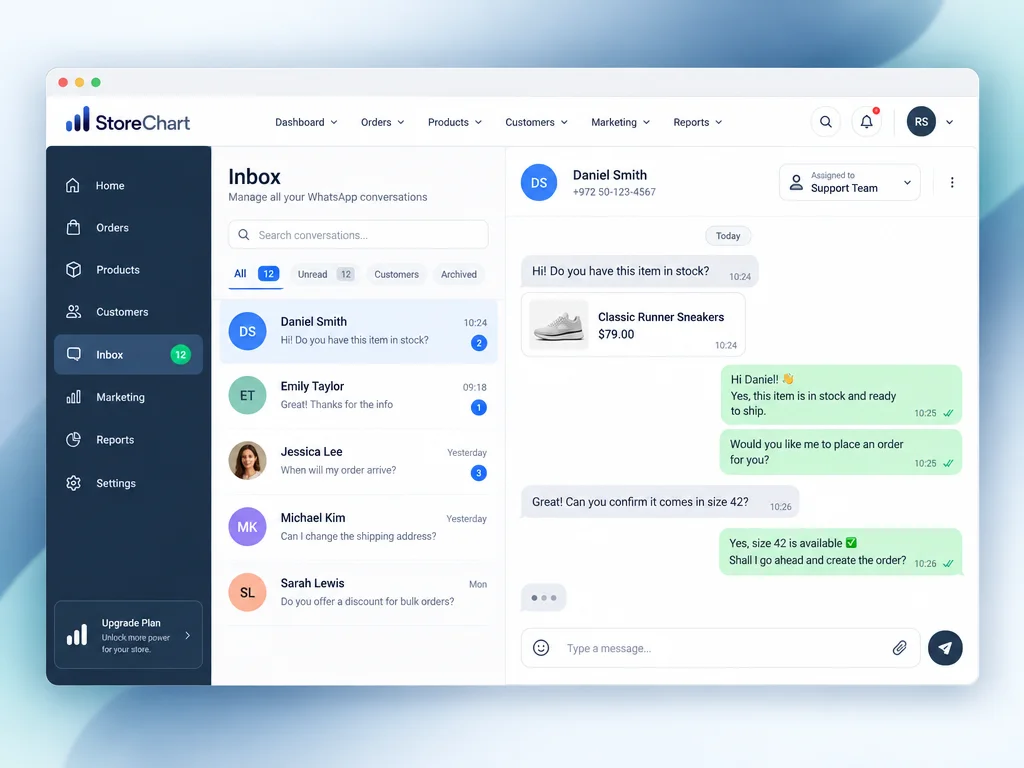
Every WhatsApp conversation, in one place, for the whole team
Not a personal inbox — a shared one with full context attached
- Multiple team members can view and reply to conversations at the same time, without overwriting each other's replies
- Every conversation is automatically matched to the customer's CRM profile, complete with their full order history
- Read/unread status and per-agent assignment prevent duplicate replies and conversations that quietly fall through the cracks
- The inbox handles text, images, documents, voice notes, and location — every message type customers actually send
WhatsApp Inbox capabilities
Advanced business messaging with full CRM context attached
How do you get started?
Connecting WhatsApp in 3 steps
Connect through Meta's Embedded Signup, a guided flow that typically takes about three minutes and links your business WhatsApp number directly to StoreChart.
Every incoming message appears in the inbox already matched to the customer's CRM profile and order history, so your team replies without hunting for information elsewhere.
Reply directly from the inbox with text, files, or approved templates, assign conversations to specific agents, and track read/unread status for every conversation.
WhatsApp inbox screen
The inbox view shows the list of active conversations on one side and the customer's CRM profile with order history on the other, so an agent sees full context without switching screens.


Frequently asked questions
Connection happens through Meta's official Embedded Signup flow, which takes about three minutes on average and verifies the number directly with Meta. Once connected, every inbound and outbound message from that number appears in StoreChart's unified inbox.
Related capabilities
Connect WhatsApp to one shared team inbox
Setup takes about three minutes, and your first inbox is free