
In a small company, information tends to scatter: orders in the online store, stock in a spreadsheet, customer details with whoever answered the phone, invoices in another tool and conversations in WhatsApp. With a few orders a week, memory connects the dots. As the business grows, the mistakes start: an item sold after it ran out, a customer who gets two different answers, an invoice nobody issued. Business management software pulls all of that into one place. This guide explains what it covers, how it differs from ERP and CRM, which modules you need, when one system beats several tools, and how to choose and switch.
What is business management software
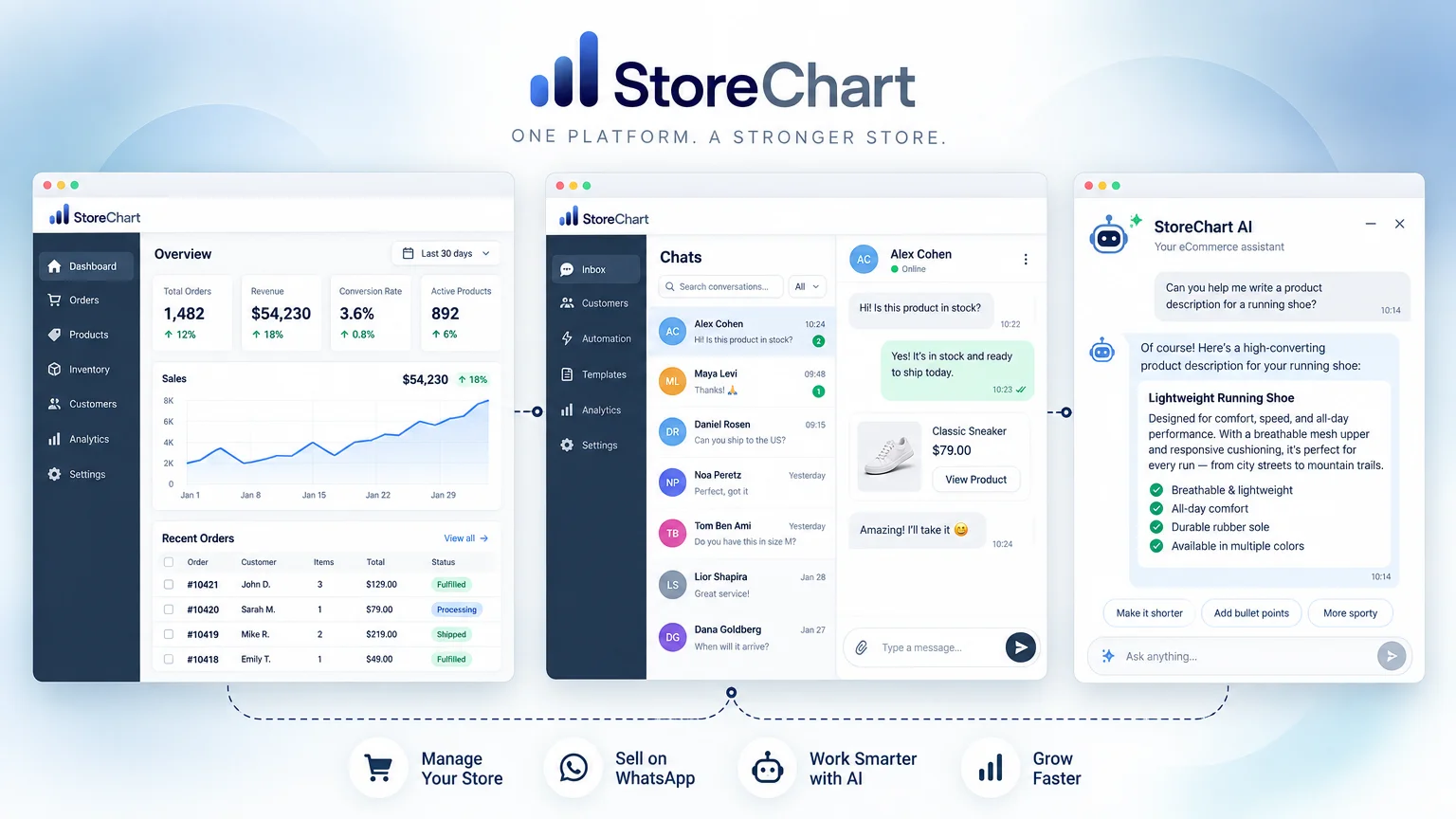
Business management software is one application, or a set of connected tools, where the day-to-day operations of a company run. It follows every order from the moment it arrives to the report at the end of the month:
- Order and stock: taking the order and checking the item is in stock.
- Customer: keeping the customer's details and history.
- Money: collecting payment and issuing the document.
- Update: telling the customer where the order stands.
- Report: a picture of what happened at month end.
ERP vs CRM vs accounting software
The label is broad, and very different products are sold under it. Four other kinds of software sound similar, and it pays to separate them before you compare prices:
- ERP. Enterprise resource planning, for companies whose manufacturing, purchasing, warehouses, finance and HR share one database. Powerful, but implementation is long and assumes processes defined in advance.
- CRM. Customer relationship management: leads, inquiries, conversation history and a sales pipeline. Most CRMs have no inventory and no real order management.
- Accounting software. Invoices, the general ledger, tax filings and your accountant's workflow. This is the official side of the money, not daily operations.
- A store platform. WooCommerce or Shopify run the catalog, cart and checkout on your website. They hold orders, but not leads, suppliers, expenses or messaging conversations.
| Type | Built for | Usually missing | Best fit |
|---|---|---|---|
| ERP | Manufacturing, purchasing, finance and HR on shared data | Simplicity, fast setup, small-business pricing | Manufacturers and multi-department companies |
| CRM | Leads, inquiries and a sales pipeline | Inventory, orders and payments | Service firms and B2B sales teams |
| Accounting software | Invoices, books and tax filings | Orders, customers and stock | Every business, with its accountant |
| Store platform | Catalog, cart and checkout | Leads, suppliers, expenses and messaging | Anyone selling on a website |
| Business management software | Orders, inventory, customers, payments and messages in one place | The depth of a specialist tool in each area | Small and mid-sized businesses that sell products |
Small business management software sits in the middle. It borrows the shared data of ERP and the customer record of CRM, and connects to the store and the accounting software rather than replacing them. So the first question is not which system is most powerful, but which part of your work lives in more than one place today.
Signs a spreadsheet is no longer enough
A spreadsheet is a fine tool for a new business, and many run on one for years. These are the signs it has started costing more than it saves:
- Double entry: a web order copied by hand into the sheet.
- Conflicting versions: more than one person edits the file.
- Stock that doesn't match: the count in the sheet differs from the shelf, and items sell after they run out.
- Hour-long questions: finding who bought a product last quarter takes manual filtering.
- Late profit numbers: you only see real profitability when your accountant closes the year.
Business management system modules
A small business needs seven modules, though not all of them on day one. The real value is in the links between them: an order that comes in updates everything else, without anyone typing it again.
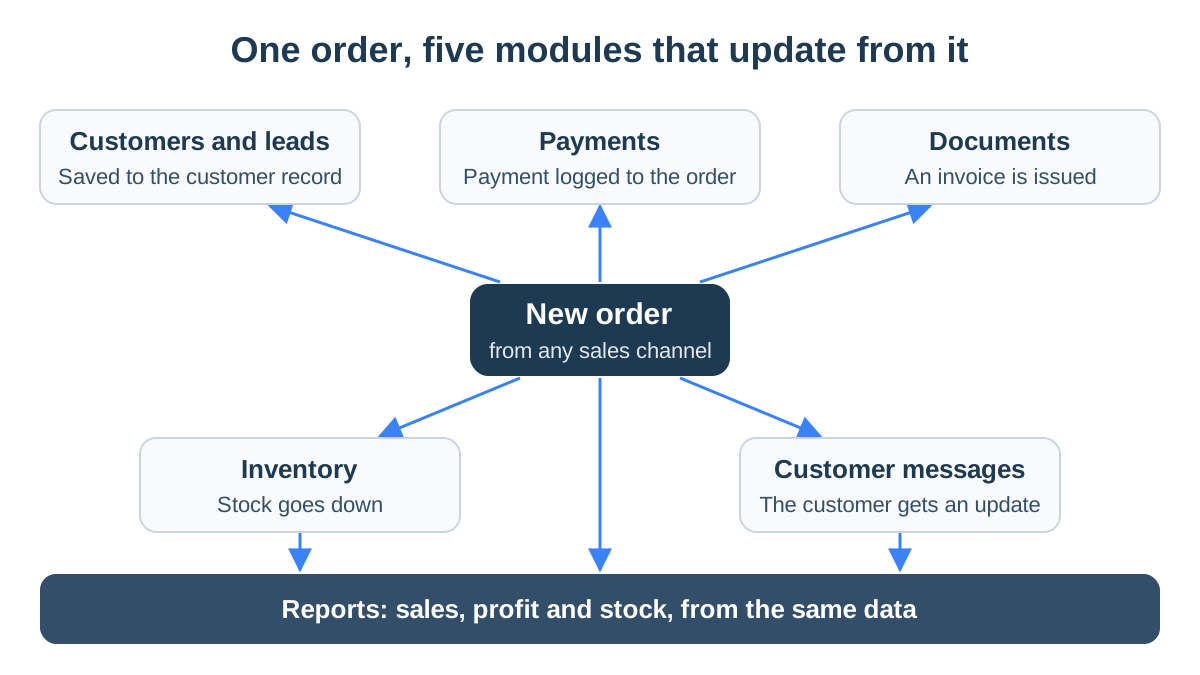
- Orders. Every order from every channel in one list, with statuses that match how you work. In StoreChart order management, orders from every connected WooCommerce and Shopify store land in the same list, and you define the statuses yourself.
- Inventory. A quantity for every product, an alert when something runs low, and a count per warehouse if you have more than one. Inventory management tracks the quantities, and an importer can calculate the landed cost of each shipment in the imports module.
- Customers and leads. A customer record with every order, plus the leads who have not bought yet. The customer record shows purchase history. Leads sit on a board by statuses you define, and a lead converts into a customer when they buy.
- Documents and invoices. Quotes, delivery notes, invoices and receipts. Tax rules for invoices are local, so this is where "does it work in my country" matters most. StoreChart does not issue invoices itself; more on that in the section on choosing.
- Payments. Card payments by link, by payment page, or in installments. StoreChart payment pages charge through a Tranzila merchant account, an Israeli card processor, and each page can cap the number of installments.
- Customer communication. Many customers now ask their questions over WhatsApp. The shared WhatsApp inbox shows each conversation next to the customer's details and orders, and the WhatsApp Business guide explains the options.
- Reports. Sales, stock and above all profitability, after product cost, shipping, fees and expenses. StoreChart has profit reports and BI dashboards, and the expenses module can collect supplier invoices from Gmail automatically.
Beyond those seven, once more than one person works in the business you need a login for each person and role-based permissions. That way the warehouse assistant doesn't see profit reports and the service rep can't delete products.
Example: one order in a skincare store
Say an online skincare store receives an order for three products. In a connected system, this is how the order moves without retyping:
- The order enters the list and is matched to the customer by phone number.
- The quantities come off stock.
- The payment is logged against the order, and the connected invoicing software issues the invoice.
- When the status changes to "shipped," the customer gets an update.
- At month end the order shows up in the profit report with its real cost.
In a spreadsheet, every one of those steps is a manual action someone has to remember.
The figures in this article's examples are illustrative only and do not reflect actual customer data.
For what to demand from each module, see the business management software features that matter.
All-in-one business software vs a stack
There are two ways to build your company's system. You can choose one product that covers most modules, or connect several tools that are each best in their field: a store, a CRM, invoicing software, an email tool and a spreadsheet. Both approaches have a price, and it helps to know it up front.

| All-in-one | Connected stack | |
|---|---|---|
| Customer record | One, with every order and conversation | A copy in each tool, kept in sync |
| Depth in each area | Good for most needs, less than a specialist | The most specialized tool for each job |
| Connections | Built in, nothing to maintain | Every connection is one more thing that can break |
| Subscriptions and interfaces | One bill, one interface to learn | Several bills, several interfaces |
| Vendor dependence | High: hard to replace just one part | Low: swap one tool without touching the rest |
| Who owns a problem | One vendor | Sometimes each vendor points at the other |
When each approach fits
- All-in-one: when most of the pain sits between your tools. Double entry, customers in three places, and no single report tying sales, stock and expenses together. That is common in small businesses that sell products.
- A connected stack: when one area of the business is unusually deep and a general system won't cover it. Examples are manufacturing with bills of materials, accounting across several companies, or a large contact center.
- The middle path: one core system for operations, plus a few well-defined links to specialist tools. This is where most businesses end up.
The middle path in StoreChart
This is what the middle path looks like with StoreChart at the core:
- The store: stays on WooCommerce or Shopify, and its orders, customers and products flow into the system.
- Accounting: stays in the software your accountant works in.
- Outside tools: send data in through an inbound webhook or through Make.
- One direction: StoreChart receives data this way, and it does not send events out to other tools.
How to choose business management software
Choose software by your processes, not by the longest feature list. Start with one page that describes a working day: how an order arrives, who checks stock, how you get paid, who issues the invoice and who answers the customer. Take that page into every demo, and ask the vendor to show your process rather than their slides.
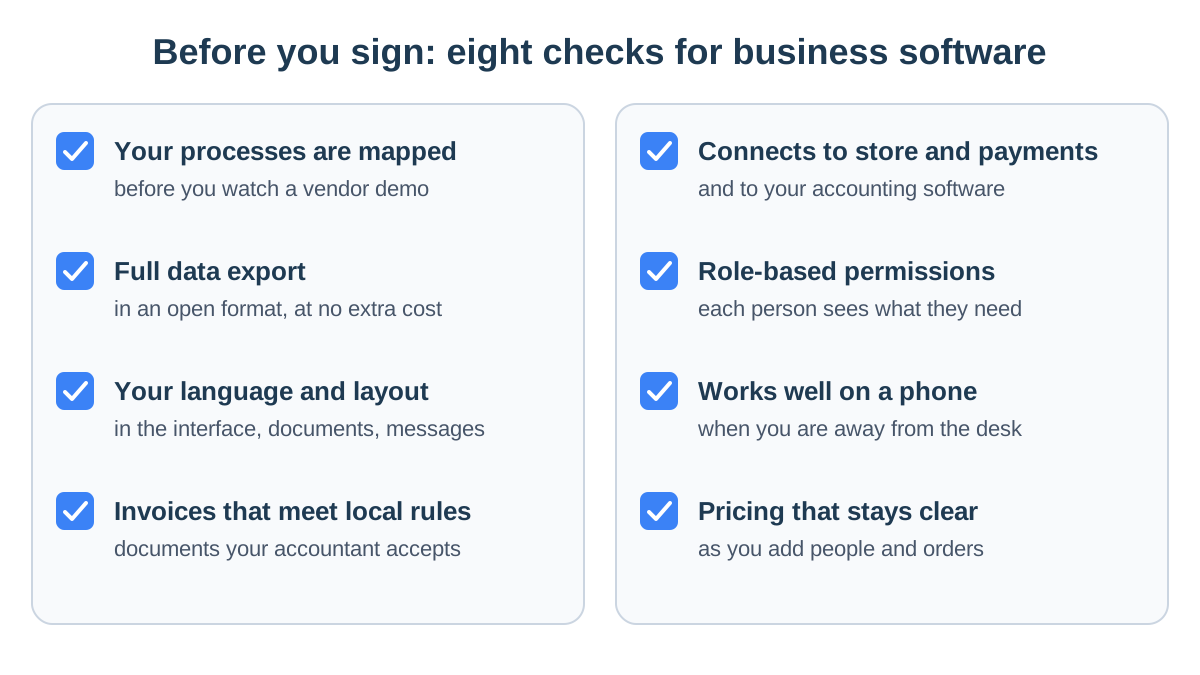
Business software selection checklist
- Your processes are mapped. Before the first demo, write down the five processes you repeat most, and test every system against them.
- Your data, and you can take it with you. Ask which data can be exported, in what format, and whether it costs extra. Ask what happens to your data if you cancel, and how long it is kept.
- Your language and layout. The interface, customer documents and messages should work in the language your team and customers use. StoreChart's interface is available in English and Hebrew, including right-to-left layout.
- Invoices that meet local rules. Requirements differ by country and sometimes by state. Check that invoices come from software your accountant accepts, and ask how taxes are calculated for where you sell.
- Connections. To your store, your payment processor, your shipping carriers and your accounting software. A connection that does not exist today is manual work tomorrow.
- Permissions. A login for each person, and roles that decide what each one sees and may change.
- Works from a phone. A small business owner is not always at a desk. StoreChart is a PWA you install from the browser, and it works on a phone.
- Pricing over time. How the price changes when you add a person, a store or more orders, and what is billed separately. Every cost component is broken down in how much business management software costs.
Taxes and invoices by country
Tax and invoice rules are local, so check who handles each job where you sell:
- United States: sales tax on online orders is usually calculated by the store platform or a dedicated tax service, and your accounting software records it. StoreChart does not calculate US sales tax, so keep that job where it is today.
- Israel: a tax invoice to a business customer above a threshold needs an allocation number from the Tax Authority before the customer can deduct the VAT. The software that issues the invoice requests it.
- Anywhere: ask each vendor who issues the legal invoice, which rules that software follows, and what happens when the tax authority's service is down.
How this works in StoreChart
StoreChart is not accounting software, and on current plans it does not issue tax invoices itself. For payments taken through StoreChart, whether on a storefront built in StoreChart, a payment page or a manual charge, Israeli merchants can connect SUMIT, which issues an invoice-receipt automatically after each payment. The invoicing software handles allocation numbers and tax reporting.
Questions to ask every vendor
- Show me how an order from my website comes in, and what happens to it until it ships.
- How do I import the customers, products and orders I have today, and who does it?
- What data can I export, and what happens to it if I leave?
- What is not included in the price: messaging, card processing, connectors, extra users?
- What support is available, in which language and during which hours?
- What does your system not do? A vendor who answers that honestly saves you months.
Small business ERP: when it fits
A small business ERP is worth the investment in three situations. In each, the data has to live in one place with the accounting, which is exactly what ERP is built for:
- Manufacturing: the company makes its own products and manages bills of materials and raw materials.
- Complex purchasing: buying is planned across many suppliers.
- Several companies: more than one legal entity needs consolidated reports.
A company that sells finished products, online, over messaging or to trade customers, pays for complexity it does not need, and usually for a long implementation too. If you run a business of a few people, small business management software shows a practical place to start.
Switching to a new business system
Switch in stages, not on a single day. The old system keeps running until the new one proves it holds the same data, and the team learns on real work. These are the stages:
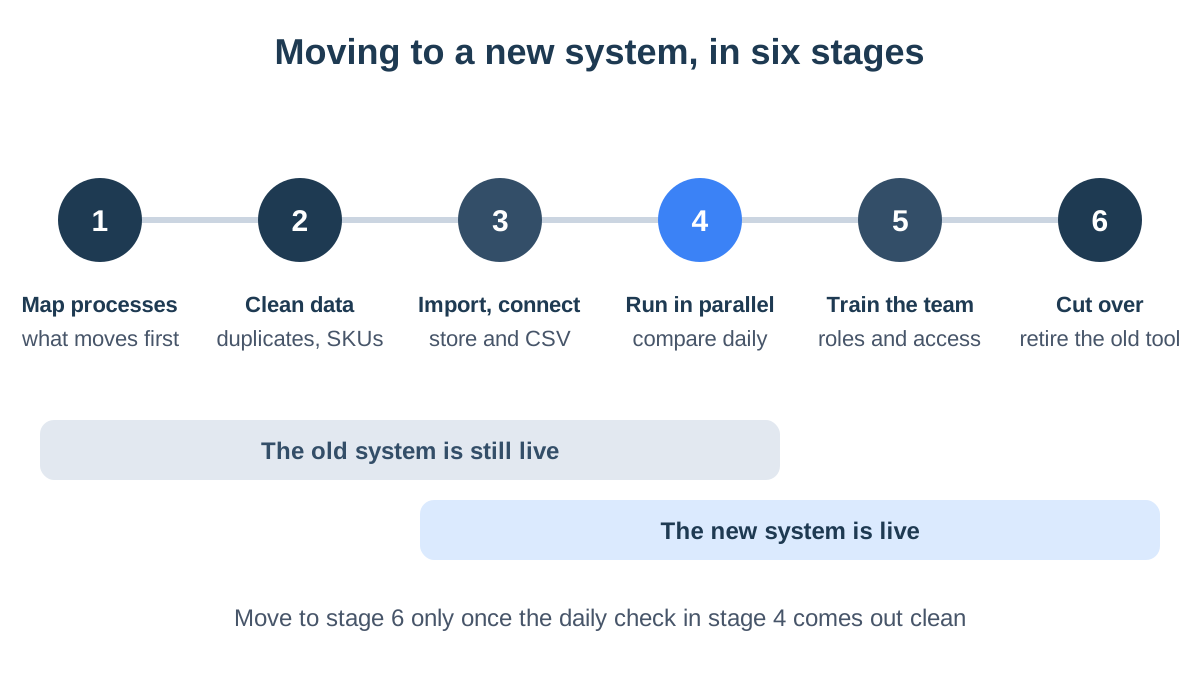
- Map processes. Decide what moves first. Usually orders and customers, and only later inventory, reports and automations.
- Clean the data. Merge duplicate customers, put phone numbers into one format, and make sure every product has a unique SKU. Messy data moved into a new system stays messy.
- Import and connect. Connect the store, then import the rest from files. In StoreChart, a WooCommerce or Shopify store syncs once connected, and customers, products, orders and order items can be imported from CSV files.
- Run in parallel. For a defined period, work in both systems and compare every day: the same orders, the same totals, the same stock counts.
- Train the team. A login for each person, a role for each login, and practice on real orders rather than demo data.
- Cut over. Close the old tool to new entries, and keep a final export of it for your records.
Common switching mistakes
- Switching in peak season. The weeks before the holidays or a big sale are the worst time to learn a new system.
- Everything at once. Move orders, inventory, automations and reports in the same week, and you cannot tell what broke what.
- Importing without cleaning. A customer who appears three times in the spreadsheet appears three times in the new system.
- No owner. One person in the business needs to own the switch, with time set aside for it.
StoreChart: who it's for and what's not included
StoreChart is built for businesses that sell products, online and over WhatsApp, and want orders, customers, inventory and conversations in one place. It does not try to be an ERP, and it is worth saying plainly what it does not do.
Online store management software
StoreChart fits five kinds of business best:
- WooCommerce or Shopify stores: especially anyone running several stores who wants every order in one list.
- WhatsApp sellers: businesses that sell and answer customers on WhatsApp, and get paid through payment pages.
- Importers: anyone who needs the real landed cost of each product.
- Ambassadors and distributors: brands that sell with coupons and commissions, or through distributors, using sales channels.
- Small teams: anyone who needs role-based permissions, shared tasks and a lead board.
What StoreChart doesn't include
- Manufacturing. No bills of materials, raw materials management or production planning.
- Payroll and HR. No payroll, time tracking or employee management.
- Accounting. No general ledger, tax returns or accountant workflow, and US sales tax is not calculated.
- In-store checkout. StoreChart has no point-of-sale (POS) module for taking payments at a counter.
- Appointment booking. A service business that needs a booking calendar will need another tool.
- Customer-specific pricing for trade buyers. No per-customer prices and no tracking of payment terms, although there is a distributor sales channel.
- A store-listed mobile app. StoreChart is a PWA you install from the browser, on a phone or a computer.
If most of your work is in the first list, it is worth a try. If the heart of your business is in the second, another system will serve you better, and you can run StoreChart alongside it just for sales and conversations. Detailed comparisons with well-known tools are in StoreChart vs monday and StoreChart vs HubSpot.
Key takeaways
- Business management software brings orders, inventory, customers, payments, messages and reports together, and connects to the store and the accounting software rather than replacing them.
- ERP suits manufacturers and complex organizations. For most small businesses that sell products, it is too heavy.
- An all-in-one system saves connections and double entry. A connected stack gives depth, at the cost of maintenance.
- Before choosing, map your processes and check data export, language, local invoicing rules and pricing over time.
- Switch in stages, with a parallel run, and never in peak season.
Frequently asked questions
What is the difference between business management software and ERP?
ERP is built for organizations whose manufacturing, purchasing, warehouses, accounting and HR all need to share one database, and implementing it usually takes months and a consultant. Business management software for a small company covers the operational side, meaning orders, inventory, customers, payments and communication, and connects to accounting software rather than replacing it.
Does a small business need an ERP system?
Usually not. A small business ERP makes sense when you manufacture with bills of materials, plan purchasing across many suppliers, or need consolidated reports for several legal entities. A company that sells finished products online, over messaging or to trade customers gets most of the value from a lighter operational system, at a fraction of the cost and setup time.
Does business management software replace accounting software?
Usually not. The operational system manages orders, customers and stock, while accounting software keeps the books, handles tax filings and is what your accountant works in. What matters is that the two are connected, so every sale produces an invoice without anyone typing it twice.
How much does business management software cost?
Most small business systems are sold as a monthly subscription priced by users, modules and order volume. On top of that come costs that rarely appear on the pricing page: card processing fees, paid messaging, paid connectors and setup time. StoreChart has a free plan and paid plans, with current prices on its pricing page.
How long does it take to switch to a new system?
It depends mostly on two things: how clean your current data is, and how many processes you move at once. Rather than picking a single switchover day, plan a period in which the old and new systems run side by side, and cut over only once the daily comparison between them comes out clean.
Does StoreChart calculate US sales tax or issue tax invoices?
No. StoreChart does not calculate US sales tax; your store platform or a dedicated tax tool does that. It also does not issue tax invoices itself on current plans. For Israeli merchants, payments taken through StoreChart can trigger an invoice-receipt from SUMIT, a connected invoicing provider.