
Business management software cost starts with the price on the vendor's pricing page, but that is only the starting point. What you pay over a year also includes the subscription's limits, the add-ons you need as you grow, setup and data migration, fees that third parties such as Meta and your card processor charge per use, and the time your team spends learning a new system. This guide breaks down each cost component, explains how common pricing models behave as a business grows, works through a hypothetical comparison of separate tools and one system, and shows how to estimate the total before you commit.
Business management software cost components
Four kinds of cost show up on almost every bill. Only the first appears on the pricing page.
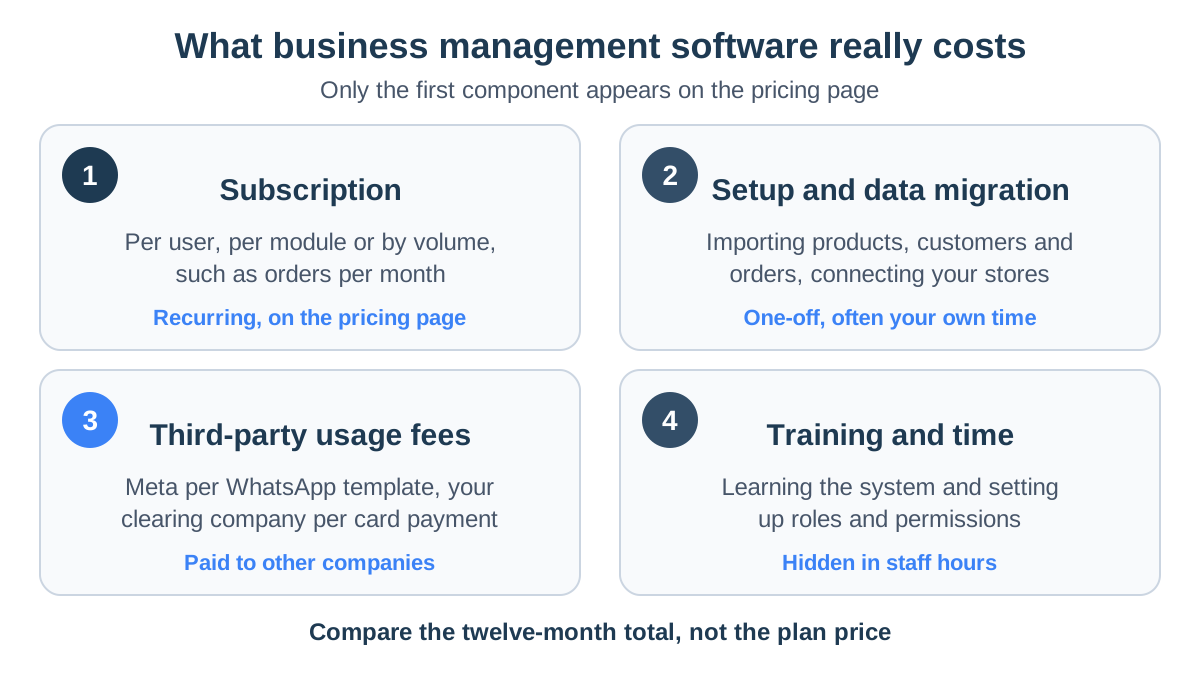
Subscription: what you pay for
The recurring fee is the part you see. It is usually tied to one or more of these units:
- Users. Every team member who logs in costs a seat.
- Modules. You pay for each capability you switch on, such as inventory, messaging or reports.
- Volume. The plan includes a set number of orders, products, stores or contacts, and a larger allowance costs more.
Most products combine two of them, for example a tier with a user allowance and a monthly order cap.
Setup and data migration
Moving to a new system takes work before it starts saving any. These are the parts of it:
- Data import: products, customers and open orders.
- Store connections: each online store you sell on is connected to the system.
- Configuration: statuses, users and permissions.
- Implementation fees: some vendors charge them. With self-serve products, the cost is your own time.
Check whether the product imports CSV files and connects directly to your store platform. Both shorten migration considerably.
WhatsApp and card processing fees
Some costs go to other companies, whichever software you choose:
- WhatsApp messages. Meta charges for each template message, by category. As of March 22, 2026, the reference rates StoreChart uses are $0.035 for a marketing template and $0.005 for a utility template. The actual rate depends on the recipient's country, and replies within 24 hours of a customer's message are free. The details are in our WhatsApp Business guide.
- Payment processing. Your clearing company charges a fee per card transaction, set in your agreement with it.
Training and team time
A system nobody learns doesn't save anything. Plan this time up front:
- First weeks: a few hours per team member.
- Roles and permissions: more time if you need to decide who sees what.
- Practice on real data: your own orders and customers, not demo data.
Pricing models: per user or tiered
The same business can pay very different amounts depending on the model, especially as it grows.
| Model | What you pay for | Predictable when | Watch out for |
|---|---|---|---|
| Per user | Each person who logs in | The team is small and stable | Seasonal staff and part-timers each add a seat |
| Per module | Each capability you switch on | You need only a few functions | Basic needs such as reports sold as extras |
| By volume | Orders, products or contacts per month | Sales are steady | Peak months pushing you into the next tier |
| Tiered plan with add-ons | A plan with allowances, plus packs you buy on top | You know your size and growth | Add-on prices, and what happens when you pass a limit |
Whichever model you face, ask the vendor two questions:
- What happens on the day you pass a limit?
- Can you downgrade later without losing data?
Worked example: an online store's costs
Is one system cheaper than several separate tools? Often, though not always.
Separate tools for a three-person team
Say an online store with three team members runs on separate tools:
| Tool | Hypothetical monthly cost |
|---|---|
| Order and inventory tool | $40 |
| CRM at $15 per user, three users | $45 |
| WhatsApp shared inbox | $50 |
| Reporting dashboard | $30 |
| Expense and receipt app | $20 |
| Integration service to sync them | $20 |
| Subscriptions | $205 |
The less visible cost is time:
- Manual work: 15 hours a month copying orders, reconciling stock and exporting data between tools.
- At $20 an hour: another $300 a month.
- Real monthly cost: about $505.
One system for the same work
Now say one system covers the same work:
- Subscription: $120 a month.
- Capacity pack: another $30.
- Manual work: drops to three hours a month, or $60.
- Total: about $210 a month.
What the example shows
- Fees stay the same. Meta's message fees and card processing fees are identical in both setups, because they go to third parties.
- Not for every business. A single system is not cheaper if you need only one of its functions. A business that just needs a CRM should compare CRMs.
- Time is the biggest line. For a business that runs orders, stock, customers and messaging together, the time saved is usually the largest line in the comparison.
We cover how small businesses weigh this in management software for small businesses.
The figures in this article's examples are illustrative only and do not reflect actual customer data.
How to estimate total cost of ownership
Total cost of ownership is everything you will pay over a period, usually twelve months, including one-off costs. Here is how to estimate it:
- 1
List what you pay for today
Write down every tool the business uses to run orders, stock, customers, messaging, reports and expenses, with its monthly price and the number of users on it.
- 2
Size the next twelve months
Estimate how many team members, stores and monthly orders you will have a year from now, and check which plan tier and which extra packs each option needs at that size.
- 3
Add third-party usage fees
Multiply your expected WhatsApp template volume by Meta's rate for each category, and your card turnover by the rate in your clearing agreement. These fees apply whichever software you choose.
- 4
Add one-off costs
Price the setup, the data migration from your current tools and the hours your team will spend learning the system, and count them in the first year.
- 5
Compare the twelve-month totals
Add subscriptions, add-ons, usage fees and one-off costs for each option, then compare the totals side by side instead of comparing plan prices.
Keep the calculation for the renewal date, and redo it when your team or order volume changes significantly. To decide which capabilities belong on the list at all, use our checklist of must-have features.
StoreChart pricing and plan structure
StoreChart sells one ladder of plans, a free tier and 3 paid plans, with paid plans starting at ₪49 a month. The model is a tiered plan with add-ons:
- Priced per plan, not per user. Each plan includes an allowance of team members, connected stores, monthly orders, products and WhatsApp numbers. Higher plans include more modules.
- Two kinds of add-on. Module add-ons switch on a hub your plan doesn't include, such as the online store or the WhatsApp inbox. Capacity packs raise one limit, for example extra orders per month, extra team members or an extra store.
- Fair billing for mid-period changes. An add-on bought mid-period is charged only for the days left in it, and a cancelled add-on stays active until the end of the paid period. If you upgrade to a plan that already includes an add-on's module, the add-on is dropped so you don't pay twice.
- Trial and yearly billing. Every paid plan starts with a 14-day free trial, and paying yearly saves 17% compared with paying monthly. The platform supports billing in ILS, USD, and EUR.
- Third-party fees stay with the third party. Meta bills you directly for WhatsApp templates. Card payments on payment pages run through your own clearing terminal, so those fees follow your agreements with those companies.
Current plans, allowances and add-on prices are on the pricing page. For what the platform covers end to end, see the StoreChart platform overview, or go back to the complete guide to business management software.
Common budgeting mistakes
- Comparing headline prices. The cheapest tier often has limits your business passes in the first busy month.
- Ignoring growth. Price the plan you will need in a year, not the one that fits today.
- Forgetting usage fees. A monthly WhatsApp campaign can cost more than the software. Estimate it with the template rates above.
- Paying twice for the same job. Cancel the old tools once the new system has taken over, not "sometime later".
- Prepaying before the trial ends. A yearly discount is worth taking only once you know the system fits. Run the trial with real data first, then switch to yearly billing.
- Skipping the exit test. Before you commit, export your orders and customers to CSV and check the file is usable. Data you can't take with you is a cost too.
Frequently asked questions
How much does business management software cost per month?
It depends on the pricing model and on your size. Per-user plans grow with every hire, volume plans grow with orders, and module plans grow with each capability you switch on. Add the fees third parties charge for messages and card payments, then compare the twelve-month total for your real team size and order volume rather than the cheapest advertised tier.
Is per-user or flat pricing better for a small business?
Flat or tiered pricing is usually easier to predict for a small team that shares work, because adding a part-time employee doesn't change the bill. Per-user pricing can be cheaper for a one-person business. Check what each tier includes, such as users, stores and monthly orders, and what an extra pack costs once you pass a limit.
What hidden costs should I expect?
The common ones are data migration from your old tools, per-message fees for WhatsApp templates that Meta charges, card processing fees from your clearing company, add-ons for capacity you outgrow, and staff time spent learning the system. Running several separate tools adds a less visible cost: the hours spent copying data between them.
Does StoreChart charge per user?
No. StoreChart plans are priced per plan, and each plan includes an allowance of team members, stores and monthly orders. If you need more, you can buy a capacity pack, such as five extra team members, on top of your plan instead of moving to a higher tier. Current allowances are listed on the pricing page.
Does StoreChart charge for WhatsApp messages?
No. StoreChart does not resell message fees. Meta bills you directly for WhatsApp template messages, through the payment method you add in WhatsApp Manager, and your StoreChart subscription is a separate charge. Free-form replies within 24 hours of a customer's last message cost nothing on Meta's side.