
In a business of one to ten people, nobody is waiting for a six-month implementation project. The owner is also the salesperson, the customer service desk and the person who closes the month, so small business management software has to start working in the first week and not add work. The usual mistake is choosing a system for everything it can do, then using half of it. This guide covers what a small business really needs: what to start with, what to postpone, a working day in three kinds of business, when a free plan is enough, and which mistakes to avoid.
Who small business management software is for
Small business management software fits a company that can no longer hold the picture in one head and one spreadsheet. Three kinds of business reach that point early:
- An online store. Orders arrive on the website, questions come in on WhatsApp or email, and stock is updated by hand. The core problem is keeping things in sync: what sold, what is left and what has shipped.
- A service business that also sells products. An aesthetician selling skincare, a personal trainer selling supplements, a studio selling equipment. Sales happen in conversation, and no single place shows who bought what and who has paid.
- A small B2B supplier. A company selling to shops or offices, in large, repeat orders. The problem is follow-up: a quote that went out, an order that was confirmed, a payment that has not arrived.
In all three cases the goal is the same: every order, customer and payment is recorded once, in one place, so everyone sees the same picture. The differences between ERP, CRM and accounting tools are explained in the complete guide to business management software.
Small business operations: where to start
A small business starts with the modules the money flows through. Everything else can wait.
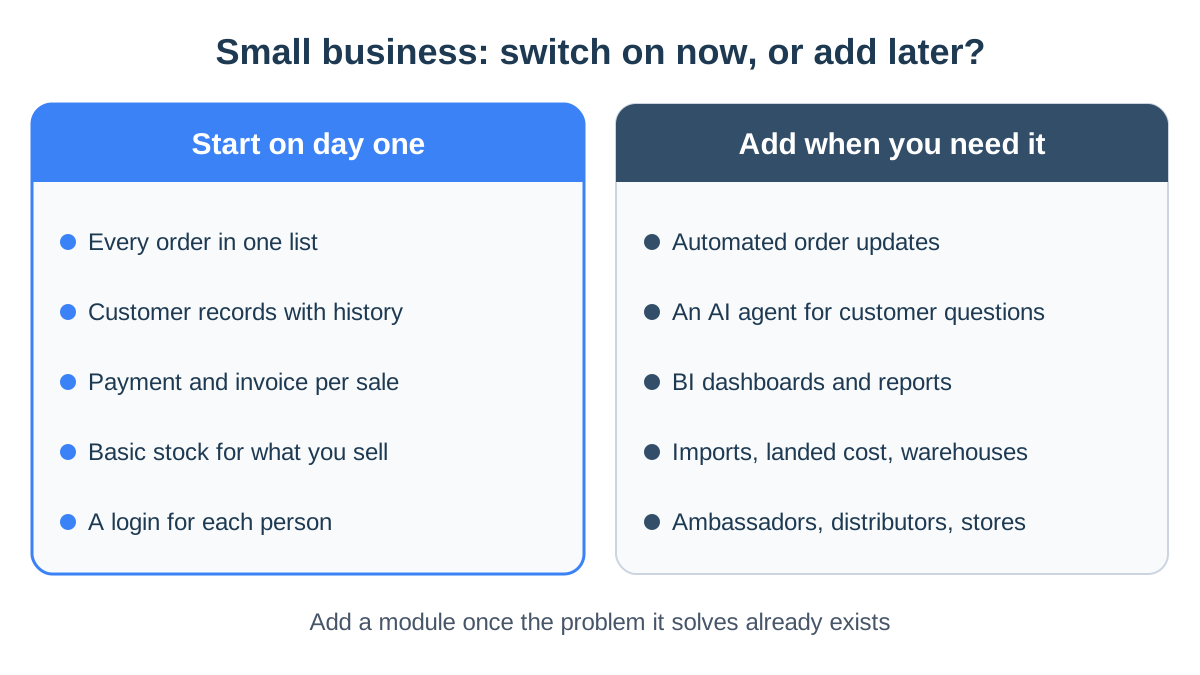
- One list of every order. From the website, from messages and from the phone. In StoreChart, orders from a WooCommerce or Shopify store sync automatically, and an order taken in a conversation is added by hand to the same list.
- A customer record. Name, phone, every order and notes. The customer record lets you answer a returning customer without asking again what they ordered.
- Getting paid and invoicing. An orderly way to take payment and issue an invoice for every sale. A payment page sent as a link covers most sales that happen in conversation.
- Basic inventory. Only if you sell physical products: a quantity per product and an alert when something runs low. You don't need several warehouses or complex costing on day one.
- A login for each person. Once there is one more person, a shared password is a problem. Each person gets their own login and permissions that fit their role.
What you can postpone
Many modules sound essential in a demo, but in a small business they only pay off once the basics work. These are the signs it is time to add each one:
- Automated order updates. Add them when you send the same message by hand dozens of times a week. WhatsApp automations send an approved template when an order's status changes.
- An AI agent for customer questions. Add one when the same questions about shipping, sizes and returns keep coming, including at hours when nobody can answer. Without a written knowledge base, the agent has nothing to answer from.
- BI dashboards and reports. Add them when there is enough data for a trend to be real. In the first months, a sales report and a basic profit report are enough.
- Imports, landed cost and warehouses. Add them when you start ordering stock from abroad or holding inventory in more than one place.
- Ambassadors, distributors and more stores. Add them when a second sales channel actually exists, not before.
The simple rule: add a module when the problem it solves already exists in your business. A list of what to check in each module is in the business management software features that matter.
A working day in a small business
Three hypothetical businesses.
Example: a two-person online store
- Morning: open the order list, filter by the status "new," and pack. Each packed order moves to "shipped."
- During the day: customer questions arrive in the WhatsApp inbox. Next to each conversation you see that customer's orders, so "where is my order?" takes seconds to answer.
- Once a week: check which products dropped below their minimum and reorder from the supplier.
- Month end: look at the profit report, not just at sales.
The profit report shows what sales hide. A product that sells a lot but ships expensively and is always discounted can earn less than one that sells a little.
Example: a service business that sells products
An aesthetician finishes a treatment and the client wants to buy a cream. Instead of writing it on a note:
- She opens an order on the client's record.
- She sends a payment page over WhatsApp.
- At month end she sees how much she sold and which product sold best.
- Each client's record shows what they bought and when, so she knows who is due a refill.
One thing to know: StoreChart has no appointment calendar, so the bookings themselves are managed in another tool.
Example: a small B2B supplier
An office cleaning supplies company works with repeat customers and new leads:
- Repeat order: comes in by phone, is entered by hand, and the customer gets a payment link.
- New leads: sit on a board by status, from "first contact" to "won."
- Tasks: remind the team whom to call back and when.
What StoreChart does not do: per-customer pricing for trade buyers, or tracking of payment terms. A business that relies on both will need another tool, or accounting software that handles them.
The figures in this article's examples are illustrative only and do not reflect actual customer data.
Free small business management software
StoreChart has a free plan, which is a good way to test the system on your real data or to run a business that is still very small. This is how the plans divide:
- Free plan: one person and one store, order management, and caps on products and monthly orders.
- Paid plans: start at ₪49 a month, with extra users, a shared WhatsApp inbox, tasks and payment pages.
- Higher plans: add automations, the AI agent and dashboards.
- Trial: each paid plan begins with a trial of at least 14 days.
The full breakdown is on the pricing page. To compare fairly, look beyond the subscription, because other costs join the monthly bill:
- Card processing fees: charged by your card processor on each transaction.
- WhatsApp template messages: billed directly by Meta.
- Paid connectors: for outside tools the business uses.
How to add up every component is explained in how much business management software costs.
When to leave the free plan
The clearest sign is a second person. As soon as someone else answers customers or handles orders, a personal login and permissions save more than the subscription costs.
Common mistakes when choosing small business software
- Choosing by feature list. A system with a hundred features, of which the team uses five, is an expensive system. Choose by the three processes you repeat every day.
- Moving everything in one day. Start with orders and customers, work with them for a few weeks, and only then add inventory and automations.
- Importing without cleaning. A customer who appears three times in the spreadsheet appears three times in the system. Merge duplicates before you import.
- Forgetting invoices. A system that does not connect to your invoicing software leaves double entry in the most sensitive place.
- One login for the whole business. With a shared password, you can't give each person only the permissions their role needs. When someone leaves, everyone has to change it.
- Not asking what it does not do. Ask directly. Better to find out before signing up that there is no booking calendar or in-store checkout than after a month of work.
Frequently asked questions
Is there free small business management software?
Yes, most vendors offer a limited free tier. StoreChart's free plan is for one user and one store, and covers order management with caps on products and monthly orders. Extra team members, leads, the WhatsApp inbox, tasks and payment pages are on the paid plans.
Should a small business start with inventory or customers?
It depends on the business. A store selling physical products starts with orders and inventory, because an item sold after it ran out costs you a customer. A service business or a small B2B supplier starts with customers and leads, because that is where money is lost when nobody follows up.
When should a small business move to a paid plan?
When a second person joins, when customer conversations need a shared inbox, when you want to take payments through payment pages, or when you reach the product or order limits of the free tier. Each of those signs means the work no longer fits one person with a basic tool.
Does small business management software issue invoices?
Some products do and some connect to invoicing software, and the legal rules for invoices depend on the country. StoreChart does not issue tax invoices itself on current plans. Israeli merchants can connect SUMIT, which issues an invoice-receipt after each payment taken through StoreChart.