
Every vendor's feature list looks long, and most of them look alike. The difference shows up on a normal Tuesday: an order arrives from the online store, stock has to drop, the customer asks about delivery on WhatsApp, and at month end you want to know what you actually earned. This checklist covers the business management software features that matter for a business selling products, explains what good looks like in each area, and gives you a concrete test to run during a free trial. For each feature we also say plainly whether StoreChart has it today.
Business management software features: the top ten
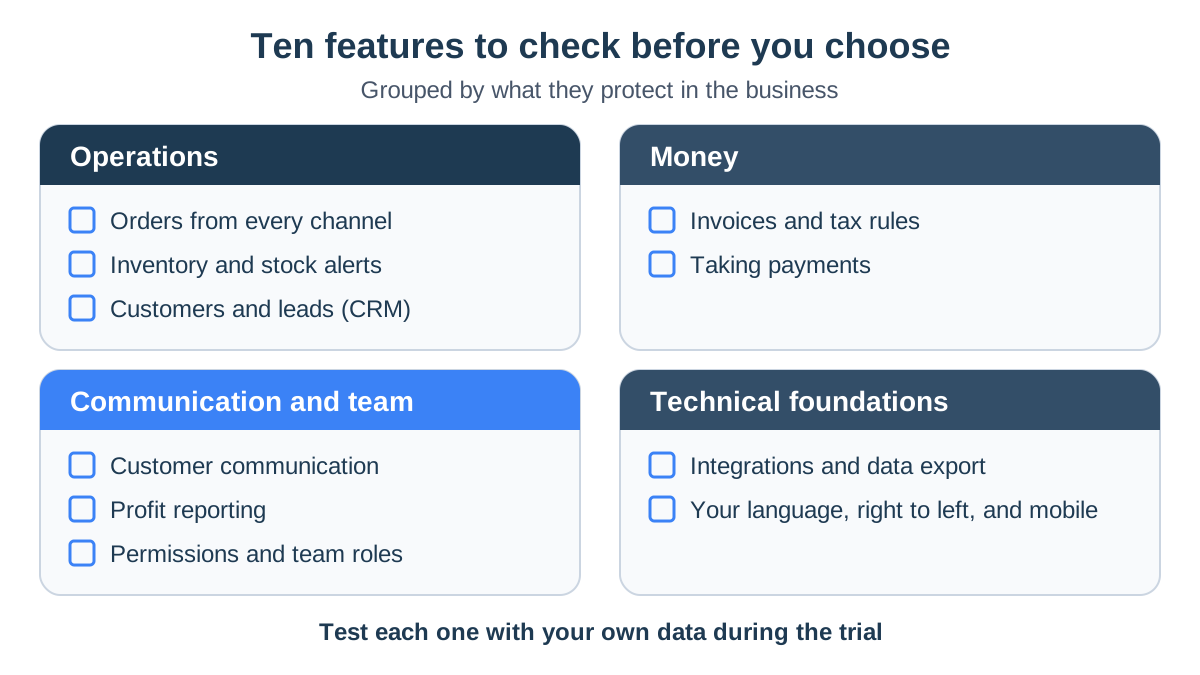
Ten areas decide whether a system can run the business or just record it. They fall into four groups:
- Operations: orders, inventory and customers.
- Money: invoices and tax, and payments.
- Communication and team: customer messaging, reporting and team permissions.
- Technical foundations: integrations and data export, and everyday usability in your language and on your phone.
Not every business needs all ten on day one. Rank them by how much time each area costs you today, and let that ranking drive the trial. For example:
- A store whose customers mostly write on WhatsApp: puts communication second, right after orders.
- A business that imports goods and sells through several stores: starts with inventory and profitability.
Operations features: orders, inventory and customers
Orders from every channel in one list
Everything else depends on this one. Look for three things:
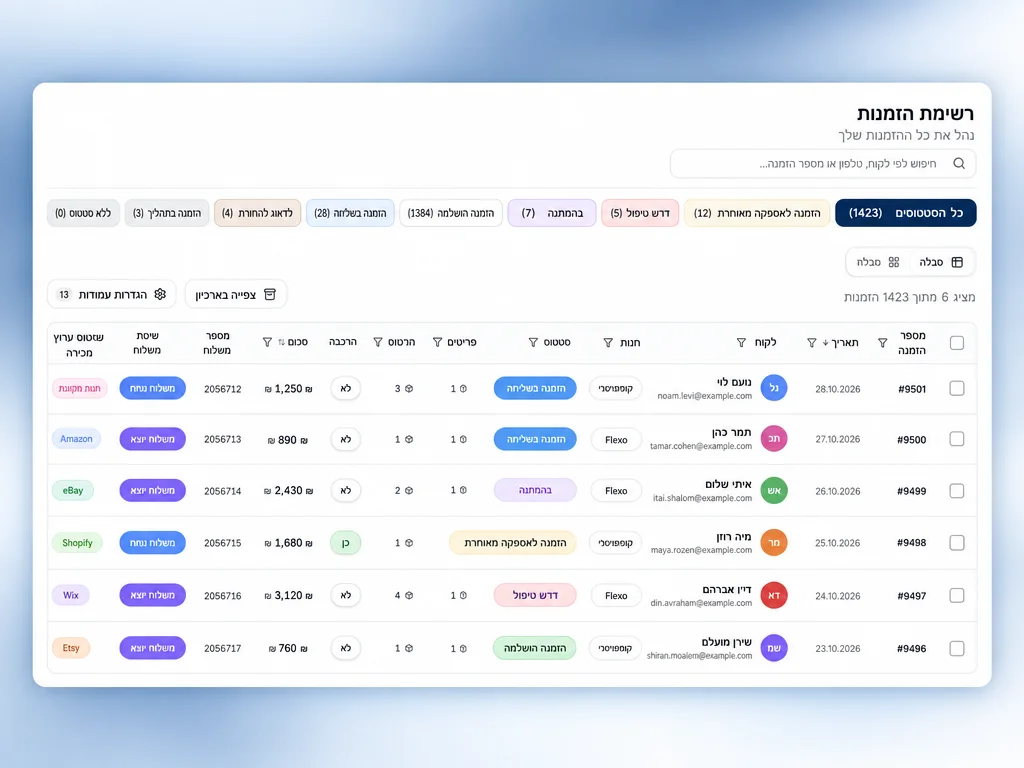
- Automatic sync: orders pulled from each store you sell on.
- One list: status, payment and shipping details on every row.
- In StoreChart: connected WooCommerce and Shopify stores, including several stores on one account, as described on the orders page.
Inventory and low-stock alerts
Good inventory tracking prevents the moment an item sells after it ran out. This is what it needs:
- Automatic updates: available stock drops when an order comes in.
- Alerts: a warning before a product runs out, and another when it does.
- Cost and supplier: a cost price and supplier next to each item.
- In StoreChart: inventory tracks stock, SKUs, cost prices and suppliers, and calculates landed cost for goods you import. Quantities update inside StoreChart and are not pushed back to your store.
Customer records and leads in one CRM
A useful CRM holds leads as well as buyers, and lets you answer a returning customer without searching:
- Customer record: contact details, tags and order history.
- Leads: a board by status, and a lead converts into a customer when they buy.
- In StoreChart: customers and leads sit in one CRM, and customer lists import and export as CSV. In the WhatsApp inbox, the customer's orders appear next to the conversation.
Invoices, VAT and payments
Tax invoices and VAT
In Israel, whatever issues your invoices has to meet several requirements:
- Allocation numbers: tax invoices above a threshold need one from the Tax Authority, and the threshold has been lowered in stages.
- Registration: the software must be registered with the Tax Authority.
- VAT: currently 18%, calculated correctly.
- Accountant workflow: the standardized file format your accountant needs, and customer import from a CSV file.
StoreChart does not issue tax invoices in its current public plans. It collects supplier invoices from Gmail into its expenses module and shows revenue net of VAT in its profit statement. Pair it with dedicated invoicing software; for payments taken through StoreChart, Israeli merchants can connect SUMIT, which issues an invoice-receipt.
Payment collection and payment pages
When collecting payments, check that the money arrives and is recorded in the right place:
- Payment link: you can send a customer a link and charge their card.
- Recorded on the order: the payment lands on the right order.
- In StoreChart: payment pages run card payments through your own clearing terminal, currently Tranzila.
WhatsApp, profit reports and team roles
Customer communication on WhatsApp
For businesses whose customers write on WhatsApp, a shared inbox on the official WhatsApp Business API beats passing a phone around. StoreChart's WhatsApp inbox includes:
- A shared inbox: the whole team answers from the same number.
- Message templates: submitted to Meta for approval.
- Broadcasts: a message to customers, with a result for each recipient.
- Automations: that keep a run history.
Profit reports
Sales totals are easy. What you need is profit after product costs and expenses:
- Profit per order: after product cost, shipping and fees.
- Profit statement: StoreChart's profitability report goes down to operating profit.
- BI dashboards: on higher plans.
Team permissions and roles
Staff should see what their job needs and nothing more. StoreChart has built-in roles:
- Management: administrator and store manager. A store manager doesn't see costs and profit.
- Team: employee, accountant, warehouse and sales rep.
- Page-level access: the owner can narrow any user to specific pages.
More on the team roles page.
Integrations, data export and language
Integrations and data export
Your system has to talk to the tools you already use, and you must be able to take your data out:
- Integrations: StoreChart offers 6 integrations: WooCommerce, Shopify, WhatsApp Business, Make.com, Webhooks, and CSV / Excel.
- Inbound webhooks: including from Make.
- Export: orders and customers to CSV.
- One direction: StoreChart receives webhooks but doesn't send its own events to other tools.
Language, right-to-left and mobile
Two things you can check on day one:
- Right-to-left: an interface translated as an afterthought breaks on mixed Hebrew and English text. StoreChart runs fully in Hebrew, right to left, and in English.
- Phone: StoreChart is a progressive web app. You install it from the browser to your home screen, as explained on the download page.
- Screens on the move: orders, stock and customer messages should be comfortable on a phone.
Testing features during a free trial
StoreChart's paid plans start with a 14-day free trial. Any trial is long enough for these tests if you split it into three stages up front:
- First days: connect your store and import products and customers.
- Middle: invite the team and work normally with real orders and customers.
- End: check the reports and try exporting your data.
Note every problem the moment it happens, so the final decision rests on facts rather than a general impression.
| Feature | Test during the trial | In StoreChart |
|---|---|---|
| Orders | Connect your real store and place a test order; time how long it takes to appear | Yes, WooCommerce and Shopify, several stores per account |
| Inventory | Sell the last unit of a product and check the stock and the alert | Yes, with low-stock alerts and landed cost for imports |
| Customers | Open one repeat customer and check that all their orders are on the record | Yes, customers and leads in one CRM, with orders also shown beside the WhatsApp chat |
| Invoices and tax | Issue an invoice and check the allocation number and VAT | No tax invoices in current public plans; supplier invoices collected from Gmail |
| Payments | Send yourself a payment link and pay it | Yes, payment pages through your clearing terminal |
| Communication | Reply to a customer from the shared inbox with two team members | Yes, WhatsApp Business API inbox, templates, broadcasts |
| Reporting | Compare last month's profit in the report with your own calculation | Yes, profit statement to operating profit |
| Permissions | Invite an employee and confirm what they can't see | Yes, built-in roles and page-level access |
| Integrations and export | Export orders and customers to CSV and open the files | Yes, CSV export, inbound webhooks, Make |
| Hebrew and mobile | Use the system in Hebrew on your phone for a full day | Yes, Hebrew and English, installed as a PWA |
Red flags when choosing software
- Demo data only. A vendor that won't let you connect your own store during the trial is hiding sync problems.
- No export. If you can't download your orders and customers, leaving will cost you your history.
- Everything is an add-on. Check what the base plan includes, and read our guide to what business management software costs before comparing prices.
- One login for everyone. Without roles, every employee sees your margins.
- Hebrew that isn't. Mixed-direction text breaking on screen means the product wasn't built for right-to-left.
- Limits you discover late. If the orders, users or stores a plan includes aren't stated clearly before you sign up, you will find out on the busiest day of the year.
- Sync that needs a human. A system where you press "refresh" to see new orders, or correct stock after every sale, sends you back to the spreadsheet within a month.
If you run a small team, our guide to small business management software covers which features to prioritize first. For the full picture, return to the business management software guide.
Frequently asked questions
Which feature matters most in business management software?
For a business that sells products, it is a single, reliable list of orders pulled from every sales channel, because stock, customer records and reports all depend on it. If orders arrive late, twice or not at all, every other feature inherits the error. Test order sync first, with real orders, before you evaluate anything else.
Does my business management software need to issue invoices?
You need invoicing somewhere, but not necessarily in the same system. What matters is that invoices are issued by software that meets your country's rules, and that the two systems share order and customer data without retyping. In Israel, that means software that can request allocation numbers from the Tax Authority.
Does business management software need to work on a phone?
Yes, but it doesn't have to be a store download. A progressive web app (PWA), installed from the browser to the home screen, opens like any other app. What matters is whether the screens you use on the move, such as orders, stock and customer messages, are actually usable on a phone. Check them on your own phone during the trial.
Can StoreChart replace my invoicing software?
Not today. StoreChart collects supplier invoices from Gmail into its expenses module and exports orders and customers to CSV, but issuing tax invoices to your customers is not part of its current public plans. Keep your invoicing software for that and use StoreChart for orders, inventory, customers, messaging and reports.