
Customers write to a store on WhatsApp at every hour, and many of their questions repeat: shipping times, sizes, returns, whether an item is back in stock. A bot answers those without anyone picking up the phone, but the word covers very different tools, from a numbered menu to an AI agent that reads free text. This guide explains the three types of WhatsApp bot, what you need before you build one, how to set up a basic bot step by step, the Meta rules every bot has to live with, and how StoreChart's WhatsApp AI agent answers customers and hands the conversation back to your team when it should.
What is a WhatsApp bot?
A WhatsApp bot is a program connected to a business's WhatsApp number that reads incoming messages and replies without a person typing. It runs on the WhatsApp Business API, through which software sends and receives messages for the number. If the app and the API are new to you, start with what WhatsApp Business is or the complete WhatsApp Business guide.
What a bot does well, and what stays with people:
- Repeat questions: shipping, sizes, returns.
- After-hours replies: evenings and weekends.
- Collecting details: a name or order number before a person joins.
- Stays with the team: refunds and angry complaints.
Types of WhatsApp bots
Menu and keyword bots
The simplest bot sends a numbered menu or reply buttons and answers according to the choice. A keyword bot reacts to words such as "shipping" or "refund" instead.
- Format: Meta's interactive messages allow up to three reply buttons, or a list of up to ten options.
- Pro: both are predictable and cheap.
- Con: both break when a customer types a sentence nobody anticipated.
Flow builders
A flow builder is a visual canvas where you draw the conversation:
- What you draw: branches, questions that collect a name or an order number, and conditions.
- Best for: structured processes such as booking or qualifying a lead.
- Con: every path is built and maintained by hand.
AI agents
An AI agent uses a language model to read the message, find the answer in the business's own information and write a reply.
- Pro: it copes with free text, typos and two questions in one message.
- Risk: inventing an answer.
- What to check: it answers only from what the business wrote, and knows when to hand over.
| Menu or keyword bot | Flow builder | AI agent | |
|---|---|---|---|
| Understands free text | No, only choices and exact words | Only where you defined it | Yes |
| Main risk | Dead ends | Paths nobody tested | A confident wrong answer if it is not grounded |
| Best for | Three or four fixed topics | Structured processes | Open questions about products and policies |
What you need for a WhatsApp bot
Three things must be ready before a bot answers customers:
- The WhatsApp Business API: the free app has no bot. Its automation stops at greeting and away messages and quick replies a person still sends by hand. Anything that reads a message and decides on a reply needs the API, through a provider or directly through Meta.
- Content: a bot is only as good as the answers behind it: shipping and return policies, product details, opening hours.
- An owner: someone on the team has to see the conversations the bot could not finish.
The process and costs are in the guide to opening a WhatsApp Business account and pricing.
Free WhatsApp chatbot options
Partly. The app's automatic messages are free, but they are not a bot. What a real bot costs:
- Meta's Cloud API: no hosting fee, and replies inside the 24-hour window are not charged.
- Your own bot: developer time and a server rather than a licence.
- Bot platforms: a subscription.
- Either way: Meta bills the template messages you send.
How to create a WhatsApp bot
To set up a basic bot for common questions:
- List the repeat questions: the five to ten asked most in last month's chats.
- Write one short answer for each, with the link or detail the customer needs.
- Connect the number to the API through your provider.
- Choose the trigger: every new message, a customer's first message, or specific keywords.
- Build the rule. In a StoreChart automation, choose the trigger "New message received", add a condition such as "Message text contains shipping", and choose the action that sends a message.
- Greet newcomers only with the condition "First message from this contact".
- Add a way out to a person, and make sure someone sees those chats.
- Test with real wording: typos, slang, two questions at once.
- Review weekly which questions got no answer.
Note: free-text messages go out only while the customer's 24-hour window is open.
WhatsApp bot limits
Four Meta rules apply to every bot, simple or AI-based:
- The 24-hour window: a bot can reply freely only within 24 hours of the customer's last message. After that it may send only an approved template, so it cannot revive an old conversation with free text.
- Templates and opt-in: when the business writes first, it must use a template Meta approved, and only to customers who opted in. A bot pushing offers to anyone else collects blocks and lowers the number's quality rating.
- Meta's rules for AI: since January 2026, Meta's WhatsApp Business API terms do not allow general-purpose AI assistants. An agent that answers the business's own customers about its products and services is permitted.
- Handing over to a person: Meta's messaging policy expects automated experiences to offer a clear path to a person. In practice, the bot says it is passing the chat on, the team sees which chats are waiting, and the bot stops once a person joins.
StoreChart's AI chatbot for WhatsApp
The StoreChart WhatsApp AI agent replies inside the same shared WhatsApp inbox your team works from. It is a customer-service agent, not a general assistant:
- It answers from its knowledge base: questions and answers, products scanned from your website, and documents. Only approved, active entries count. It does not read your order system, so it cannot tell a customer where their parcel is.
- It learns from your past conversations. A learning run reads your synced WhatsApp history, suggests questions and answers, and learns your tone. The suggestions wait for your review before the agent uses them.
- It checks its figures. Every price, size, duration and link in a reply must appear in an entry the agent opened. If one does not, it rewrites the reply once, and if that fails it follows your rule for questions it cannot answer.
- It admits what it does not know. You choose whether it sends your fallback message (the default), stays silent and leaves the chat to the team, or always tries to answer. Unanswered questions land in a list, and answering one there adds it to the knowledge base.
- It replies in the customer's language, and switches when the customer does.
- It responds to text, button taps, photo captions and voice notes, which it transcribes. It does not see the photo itself. It replies only inside the 24-hour window, within working hours if you set them, and waits a few seconds so a burst of short messages gets one reply.
Agent modes: off, supervised, auto
Each conversation has its own mode:
- Off: the team replies.
- Supervised: the agent replies on its own until someone from the team writes in that chat, from StoreChart or the WhatsApp Business app. It then stays off there until someone turns it back on.
- Auto: it keeps replying after a person joins.
Set the mode per chat, start new chats with the agent on, or switch it on with an automation. StoreChart also offers an AI chatbot for your website.
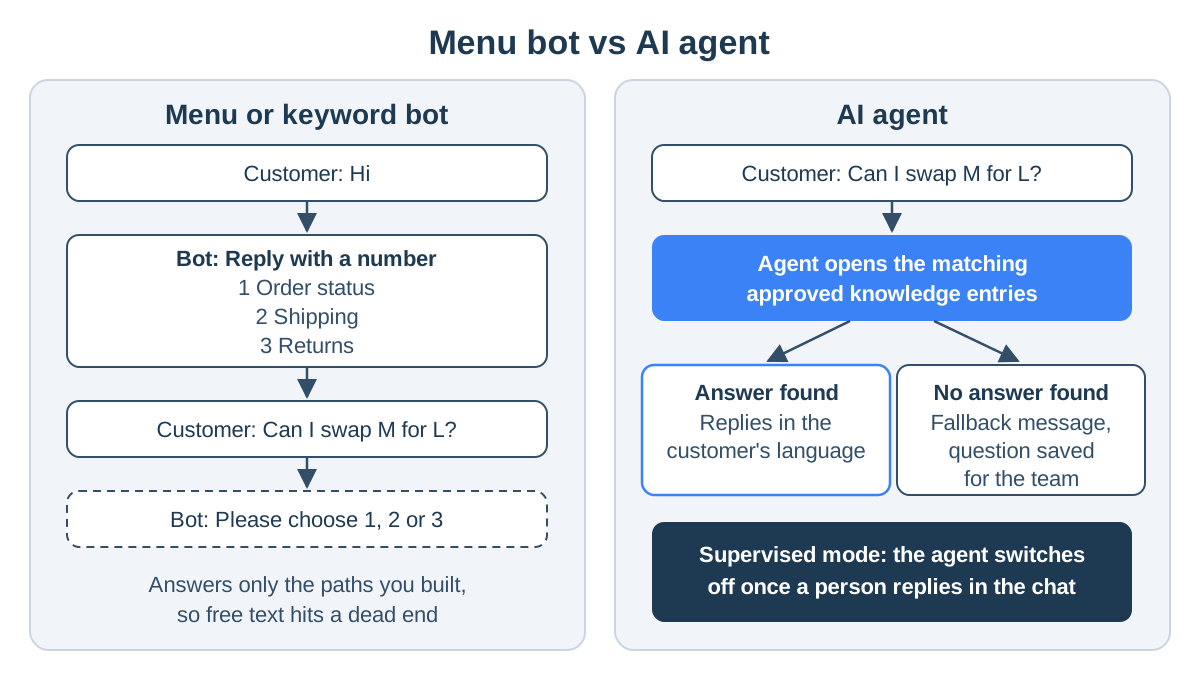
WhatsApp bot conversation examples
These examples are from a hypothetical clothing store.
A keyword bot, on its path:
Customer: shipping?
Bot: Orders ship within 2 business days. Reply 1 for delivery times or 2 for returns.
The same bot, off its path:
Customer: I ordered an M yesterday, can I switch to an L before it ships?
Bot: Sorry, I didn't understand. Reply 1 or 2.
An AI agent, same question:
Customer: I ordered an M yesterday, can I switch to an L before it ships?
Agent: Yes, you can change the size until the order ships. Send us your order number and the team will update it.
Customer: 10482
Team member: Done, you'll get the L.
The agent answered the policy from the knowledge base; the change took a person, because the agent does not access orders. In supervised mode, the team member's message switched the agent off in that chat.
The figures in this article's examples are illustrative only and do not reflect actual customer data.
Frequently asked questions
Can I create a WhatsApp chatbot for free?
Partly. The free WhatsApp Business app has greeting and away messages, but no bot. On the API, Meta's Cloud API has no hosting fee and replies inside the 24-hour window are not charged, so a self-built bot costs developer time and a server. Bot platforms charge a subscription, and Meta bills template messages either way.
How is a WhatsApp chatbot different from an AI agent?
A classic chatbot follows a menu, keywords or a flow someone built, and fails when a customer writes something it was not built for. An AI agent reads the message itself, finds the answer in the business's information and writes a reply in the customer's words, so it copes with free text, typos and two questions at once.
Can a WhatsApp bot message a customer first?
Only with a template Meta approved in advance, and only to a customer who agreed to receive messages from the business. Free-text replies, whether a bot or a person writes them, are allowed only within 24 hours of the customer's last message.
Does StoreChart's WhatsApp AI agent see a customer's orders?
No. It answers from the agent's knowledge base: questions and answers, products scanned from your website, and documents you added. It cannot look up where a specific order is, so it can explain your shipping policy while the team confirms the order itself.
What if the AI agent doesn't know the answer?
You choose. By default it sends your fallback message instead of guessing; you can also have it stay silent and leave the chat to the team. Either way the question is saved to a list of unanswered questions, and answering it there adds it to the knowledge base.