
When you run an online store, money arrives from several directions: card payments through your payment provider, PayPal payouts, marketplace deposits, and sometimes a bank transfer from a business customer. Money also leaves for suppliers, shipping carriers, ads and subscriptions. Each sale needs a proper document, each expense needs a kept invoice, and at the end of each period the numbers have to reach the tax authority. Accounting software for online stores is the tool that holds that official side together. This guide explains what it does, which documents a store needs, how the work splits between you, the software and your accountant, what to check before choosing, and which mistakes cost money.
What accounting software does for an online store
Accounting software keeps the official record of the money in a business. It does four main jobs:
- Issues documents. Invoices, receipts and credit notes, numbered in sequence so no document can be skipped or silently deleted.
- Records income and expenses. Every document issued and every supplier invoice goes into the books, with its amount, tax, date and category.
- Reconciles against real money. Payouts from payment providers and bank transactions are matched to documents, so it is clear what was paid and what is still open.
- Produces reports and tax data. Profit and loss, balance sheet, tax totals for the period, and a file your accountant can import.
Invoicing software vs full accounting software
The market splits into two families:
- Invoicing software: focuses on the first job. It creates the documents, emails them to customers and connects to the store and the payment provider.
- Full accounting software: adds the books themselves: double-entry ledgers, bank reconciliation, account statements and financial reports.
- A mix of both: many products sold to small businesses combine the two to different degrees.
For a small online store, good invoicing software plus an accountant who keeps the books from its data is often enough. A company with employees, several legal entities or a large turnover should ask its accountant whether full accounting software is needed and which bookkeeping method applies. That is a professional decision worth making together, not alone.
Where small business accounting time goes
In small business accounting, most of the time goes not into the filing itself but into preparing for it:
- Gathering: collecting invoices from several inboxes.
- Matching: working out which payout belongs to which orders.
- Chasing: finding the refund that never got a credit note.
Good software shortens exactly that part, because documents are created at the moment of the sale instead of being rebuilt at the end of the month.
What accounting software does not do
- Stock: it does not manage inventory.
- Profit: it does not show which product is still profitable after shipping and fees.
- Service: it does not answer customers.
- Connections: not every product connects to every store.
The operational side of the store runs in the platform and an operations system. We cover the difference between the categories in the guide to business management software, and the glossary entry on ERP explains when one large suite makes sense instead.
Documents and reports an online store needs
The exact list depends on where you are registered and what you sell, and your accountant is the right person to confirm it. Most stores meet the same core documents almost every day:
| Document | When it is issued | What to know |
|---|---|---|
| Invoice | When a sale is made, even if payment comes later | States the tax and is the basis of reporting |
| Receipt | When payment is received | Confirms payment, not the sale itself |
| Invoice-receipt | When the sale and the payment happen together, as with most web orders | The most common document for an online store |
| Credit note | When you refund or cancel a sale, in full or in part | Reverses the original invoice in the books |
Tax is where rules differ most between countries. Depending on where you sell, orders may carry sales tax, VAT or GST, and exports may be taxed differently from domestic sales. Usually the work splits three ways:
- At checkout: your store platform or a dedicated tax tool works out the tax.
- In the books: your accounting software records it.
- In the filing: your accountant files it.
What you need is for the rate on each document to match the rate the customer was charged.
Selling in Israel: VAT and tax invoices
Israeli stores registered for VAT have three more things to handle. VAT is currently 18%, and a VAT-registered business reports it every month or every two months, depending on its size, usually through its accountant.
Allocation numbers. Under the Israel Tax Authority's Israel Invoice model, a business buyer cannot deduct the VAT on a tax invoice whose amount before VAT exceeds a threshold unless the invoice carries an allocation number. According to the Tax Authority's own site, as of September 28, 2026, the threshold has come down in stages:
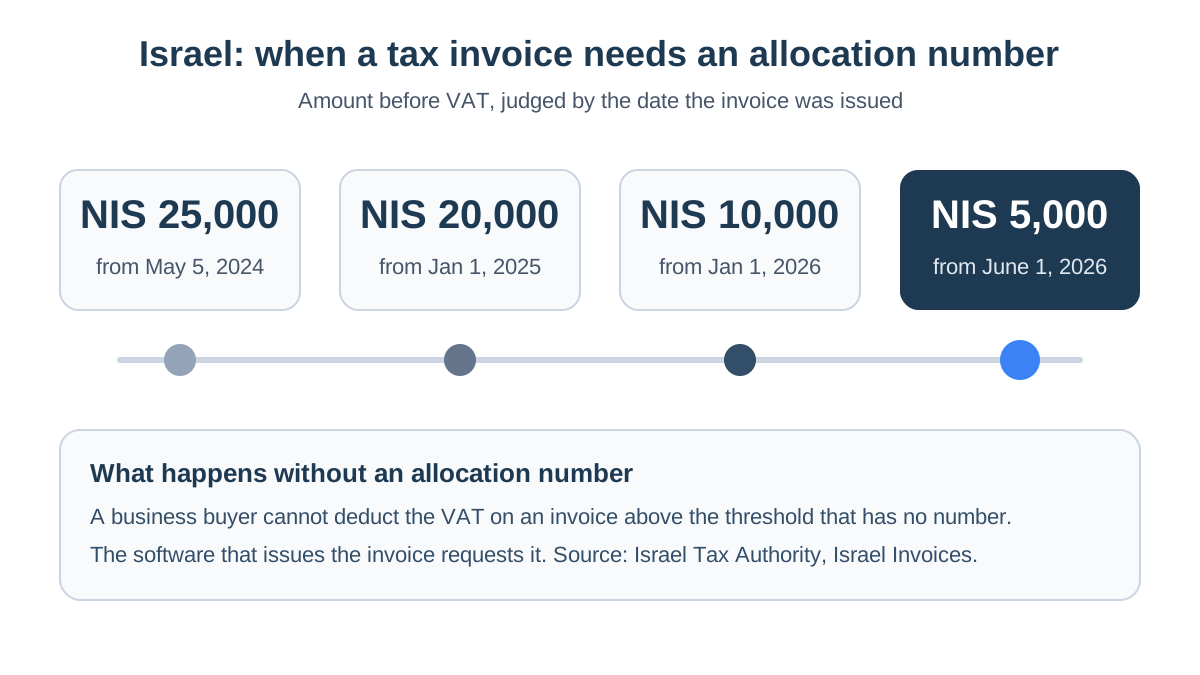
What that means in practice:
- Who requests the number: the software that issues the invoice, through the Tax Authority's service, and the number is printed on the document.
- On the sales side: for a store that sells mostly to consumers, it affects the larger orders from business customers.
- On the purchase side: a large supplier invoice without a number is VAT you cannot reclaim.
We explain the whole mechanism in Israel Invoice allocation numbers explained. The official source, in Hebrew, is the Tax Authority page everything businesses need to know about Israel Invoices.
The open-format file. Registered bookkeeping software in Israel must be able to export all of its data in a single specification published by the Tax Authority, known as the open format, for example when an auditor asks for it. That request is the moment you find out whether your software meets the rules.
Dividing the work with your accountant
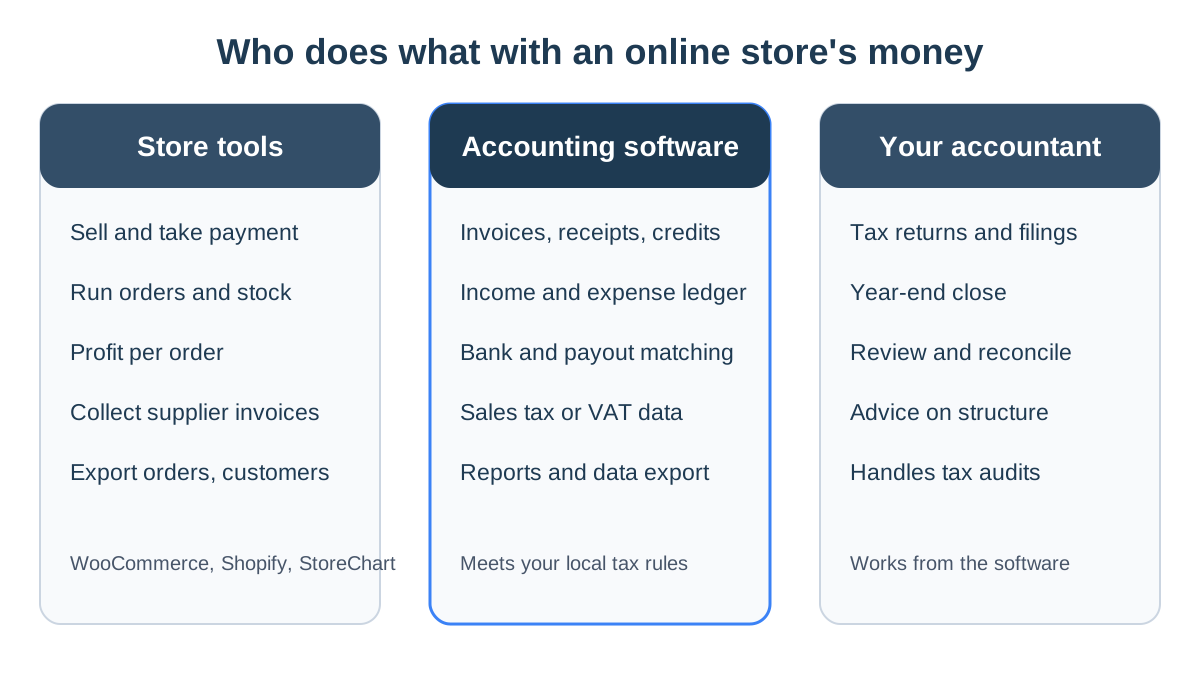
The most common confusion among store owners is the idea that one tool is responsible for everything. In practice there are three partners, each with a different job:
| Task | Who is responsible | Where it happens |
|---|---|---|
| An invoice or receipt for every order | Accounting software | Automatically, through the store or payment connection |
| A credit note for every refund | Accounting software | When the refund is made in the store |
| Collecting supplier invoices | You | In your inbox, or automatically in your operations system |
| Profit per order and per product | You | In the store's operations system |
| Tax returns and filings | Your accountant | From the data in the software |
| Year-end accounts | Your accountant | At the close of the tax year |
| Israel only: allocation numbers and the open-format file | Accounting software | When the invoice is issued, and when the file is requested |
- Your accountant: the professional. They decide how expenses are classified, file the returns, represent you in front of the tax authority and advise on how the business is structured. They should not be retyping invoices that software can issue by itself.
- Your accounting software: where the official document is born. Every invoice it issues is numbered, stored and reported, and if it is connected to the store, no order is left without a document.
- Your store tools: sell and run operations. The store platform takes payment, and an operations system brings together orders from every store, stock, costs and profit. It answers "how much did I actually make on this order", which accounting software was not built to answer.
Example: one month in a jewelry store
Picture a jewelry store selling on WooCommerce, with a few hundred orders a month, nearly all from consumers. Here is its month:
- Orders: each paid order issues an invoice-receipt through the invoicing plugin, and the customer receives it by email.
- Returns: three returns that month produce three credit notes.
- A business buyer: a company that buys gifts for its staff gets an invoice with its business name and tax ID, and, because the store is in Israel and the order is above the threshold, an allocation number.
- Expenses: invoices arrive by email from the overseas supplier, the shipping carrier, the ad platform and several subscriptions, and are collected into the expense list.
- Month end: early the next month, they go to the accountant together with the payment provider's payout report, and the accountant files the return.
Meanwhile the owner sees in the operations system that the silver rings earn less than she thought, because their shipping is expensive relative to the price.
Connecting accounting software to your store
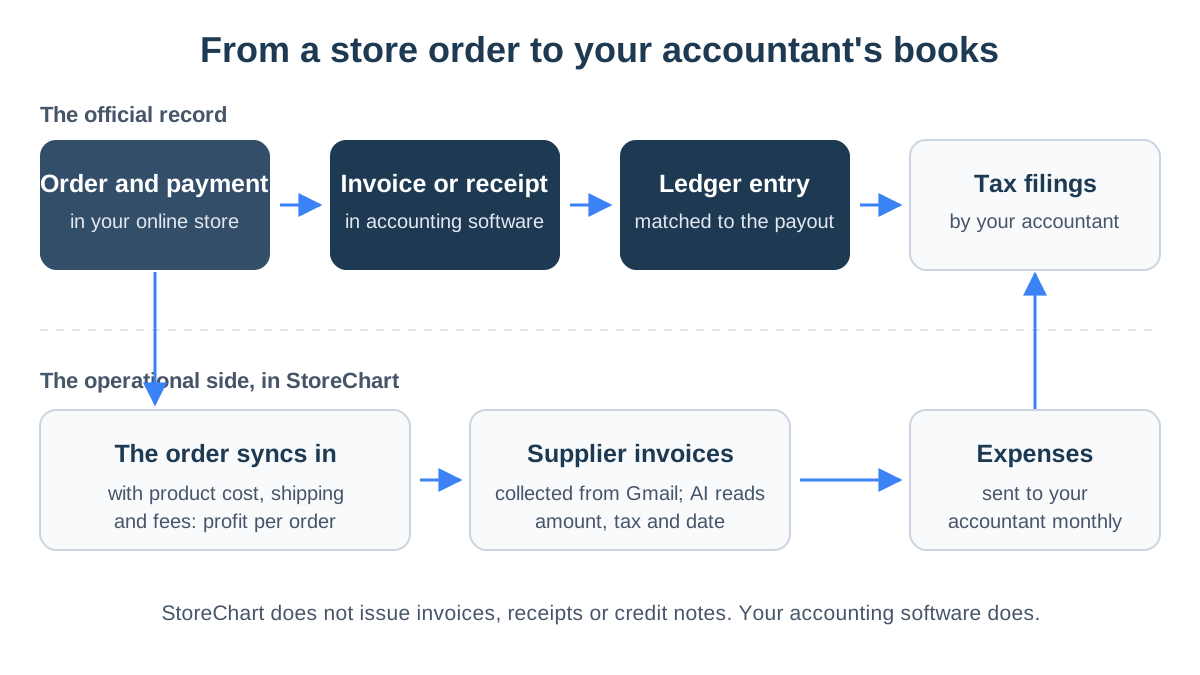
The right connections remove most of the manual work. This is the path of one order in a store that is connected properly:
WooCommerce plugins and Shopify apps
Most invoicing products offer a WooCommerce plugin, a Shopify app or a direct link to the payment provider. When it is active, every paid order produces a document with the customer's details, the lines, shipping and tax, and emails it to the customer. When you refund in the store, make sure the connection also issues a credit note, rather than only returning the money.
Three things to check in that connection:
- What triggers the document? A new order, a paid order or a shipped order. For most stores, issuing on payment is right.
- What happens with business customers? Can they enter a company name and tax ID at checkout, and do those reach the invoice?
- What happens with several stores? If one business runs several sites, they should all issue documents in the same series for the same entity. Stores owned by separate companies need separate books.
StoreChart alongside your accounting software
An operations system does not replace accounting software, but it covers what the software cannot see. That is where StoreChart works, so it is worth being precise about what it does.
StoreChart is not accounting software: it does not issue tax invoices, receipts or credit notes, does not request Israeli allocation numbers, and does not produce VAT reports or the Israeli open-format file. You do all of that in your accounting software, and StoreChart complements it in three places:
- Supplier invoices. The expenses module connects to a Gmail inbox with read-only access and collects invoices on a schedule you set. AI reads the vendor, amount, tax and date from each invoice, sorts it into a category and skips invoices it already collected. On the day of the month you choose, the expenses go to your accountant.
- Profit per order. Orders from WooCommerce and Shopify stores flow into StoreChart, and the profitability report shows each order's product cost, shipping and fees, and what is left. It rests on cost of goods sold, which invoicing software rarely works out per order.
- Data export. Export the filtered list of orders or customers to a CSV file that opens cleanly in Excel, for example so your accountant can check orders against the documents issued.
If you also track leads and business buyers before they purchase, that part is covered in the guide to customer relationship management. A steady weekly and monthly routine is laid out in online store bookkeeping.
Choosing accounting software for a small business
Choose on two things: what the law requires of it where you sell, and how it connects to your store. Everything else is convenience. Before you start a trial, go through these eight checks:
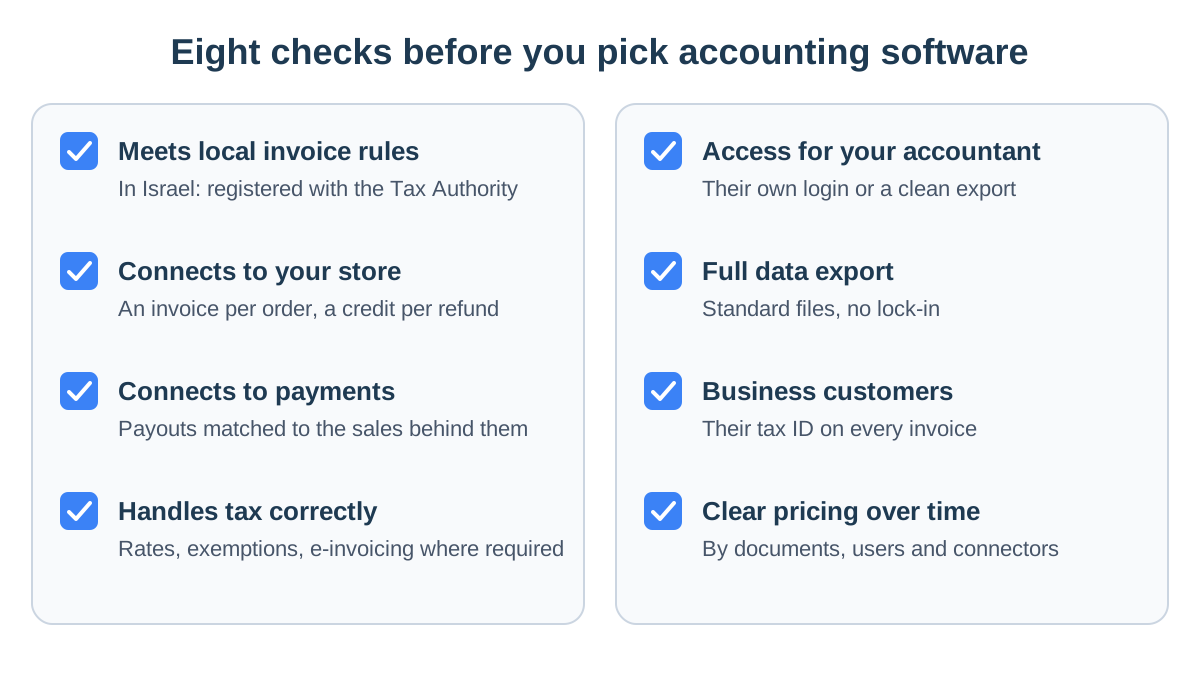
- It meets local invoice rules. In Israel that means software registered with the Tax Authority that complies with the bookkeeping instructions. Elsewhere, ask whether it supports any e-invoicing your country requires.
- It connects to your store. A WooCommerce plugin or Shopify app that creates a document for every paid order and a credit note for every refund. Ask to see it working on a real order.
- It connects to your payments. If you also take payment by link or by phone, those sales need documents too, and payouts need to match the sales behind them.
- It handles tax correctly. Rates, exemptions and prices that include or exclude tax, on every line and on shipping.
- Your accountant can work in it. Their own login or an export they can import. Ask them before you choose, since most accountants work faster in software they know.
- You can take all your data. A full export in standard files, without a support ticket, and a clear answer on what happens if you cancel.
- Business customers are handled. The company name and tax ID reach the invoice, and in Israel that is what makes an allocation number possible.
- Pricing is clear over time. How the price changes as documents grow, when you add a user or a store, and what costs extra.
Questions to ask the vendor
- What happens to an order paid in my store, from the moment payment clears to the moment the customer has the document?
- How do I issue a credit note for a partial refund, say one item out of three?
- What happens to my data if I cancel, and in what format can I take it?
- Is there a limit on documents or stores in the plan?
Mistakes that cost online stores money
Most mistakes do not come from a lack of knowledge but from a missing link between tools. These are the most frequent:
- Invoicing by hand. As long as someone creates each invoice manually, one order will eventually have no document. An automatic store connection fixes that.
- Refunds without credit notes. The money went back to the customer, but the books still show the sale, and you pay tax on it.
- Business customers without a tax ID. Without it their invoice is incomplete, and in Israel there can be no allocation number.
- Unchecked supplier invoices. In Israel, a large supplier invoice without an allocation number is VAT you will not reclaim. Check it when it arrives, not at year end.
- Payouts treated as income. A payout from your payment provider or marketplace arrives after fees. Income is the full amount of the documents you issued, and the fee is an expense that needs its own invoice.
- Mixed bank accounts. Personal spending and business bills in one account make every reconciliation longer and your accountant's job harder.
- Profit only at year end. Annual accounts arrive too late to fix a product that loses money. Profit per order, in your operations system, shows it this month.
StoreChart and your accounting software
StoreChart does not issue accounting documents and does not replace your accounting software or your accountant. It collects supplier invoices from Gmail, shows profit per order and exports orders and customers to a file, so the data that reaches your accountant is complete and in order.
Key takeaways
- Accounting software issues the official documents, records income and expenses and prepares the data for tax filings.
- Every order needs a proper document and every refund a credit note, issued automatically through the store connection.
- In Israel, a tax invoice to a business buyer above NIS 5,000 before VAT needs an allocation number from June 1, 2026, according to the Tax Authority.
- Your accountant files, the software issues, and your store tools run operations and show profit.
- Pick software that meets your local rules and connects to your store and payments, and ask your accountant before you commit.
Frequently asked questions
What is the difference between invoicing software and accounting software?
Invoicing software issues documents: invoices, receipts and credit notes. Full accounting software also keeps the ledger, reconciles the bank, and produces financial statements and tax data. A small store often gets by with good invoicing software and an accountant who keeps the books from its data. As the business grows, or once it becomes a company with employees, ask your accountant whether you need more.
Can I issue invoices straight from WooCommerce or Shopify?
It depends on your country. The store platform runs the order and the payment, and in many places its order confirmation is enough for a consumer sale. Where the law sets rules for tax invoices, as Israel does, the official document has to come from compliant software, which you connect to the store with a plugin or app so every paid order gets one.
Do I need an allocation number on every order?
Only if you sell in Israel, and even then no. An Israel Invoice allocation number is needed on a tax invoice to a business buyer when the amount before VAT exceeds the Tax Authority's threshold, which is NIS 5,000 from June 1, 2026. Sales to private consumers do not need one.
Is StoreChart accounting software?
No. StoreChart does not issue tax invoices, receipts or credit notes, does not request Israeli allocation numbers, and does not produce VAT reports or the Israeli open-format file. It complements your accounting software on the operational side: it collects supplier invoices from Gmail, works out profit per order and exports orders and customers to a file.
What should my accountant get from the store every month?
The sales documents your software issued, supplier invoices and other expenses, payout reports from your payment providers, and bank statements. If you refunded anyone, include the credit notes. When the same set arrives in the same shape every month, the tax filing takes less time and fewer questions.
How much does accounting software for a small business cost?
Most products are a monthly subscription priced by documents, users and connections. Before you compare, check what each plan includes: the store connection, the payment connection, access for your accountant and a full data export. Your accountant's fee comes on top of the software.