
Every business does customer relationship management, whether or not it calls it that. In a small store it happens in the owner's head, in WhatsApp chats and in a spreadsheet someone started once and stopped updating. That works until an inquiry arrives while everyone is busy, until a new employee does not know that the customer writing right now has already bought five times, or until a quote sent on Monday is forgotten. This guide explains what a CRM is and what it holds, how it differs from a store admin and an ERP, which types exist, how leads differ from customers, what to check before choosing one, and how StoreChart covers it.
What is a CRM: customer relationship management
CRM stands for customer relationship management. The term describes two related things:
- A way of working: everything the business knows about a customer is kept in one place, and everyone on the team sees it before they talk to that customer.
- Software: a CRM system, which makes that way of working possible.
A short definition with examples is in the glossary entry what is CRM.
The goal has not changed since shops kept an index card for each regular: know who the customer is, what they bought, what they asked for and what needs doing for them now. What has changed is the volume.
An online store can take hundreds of orders a month from several channels, plus inquiries from a website form, from WhatsApp and from a paid campaign. Without a system, the information is spread across five places and nobody sees the whole picture.
Three questions a CRM answers
A CRM answers three everyday questions:
- Who is this? When a customer writes, you see their details, what they bought and when, and whether they have an open inquiry.
- What is waiting? Which inquiries have not been answered, which quotes are waiting on the customer, and what each person on the team needs to do today.
- What is working? Which sources bring in the prospects who end up buying, how many customers come back, and which customers deserve more attention.
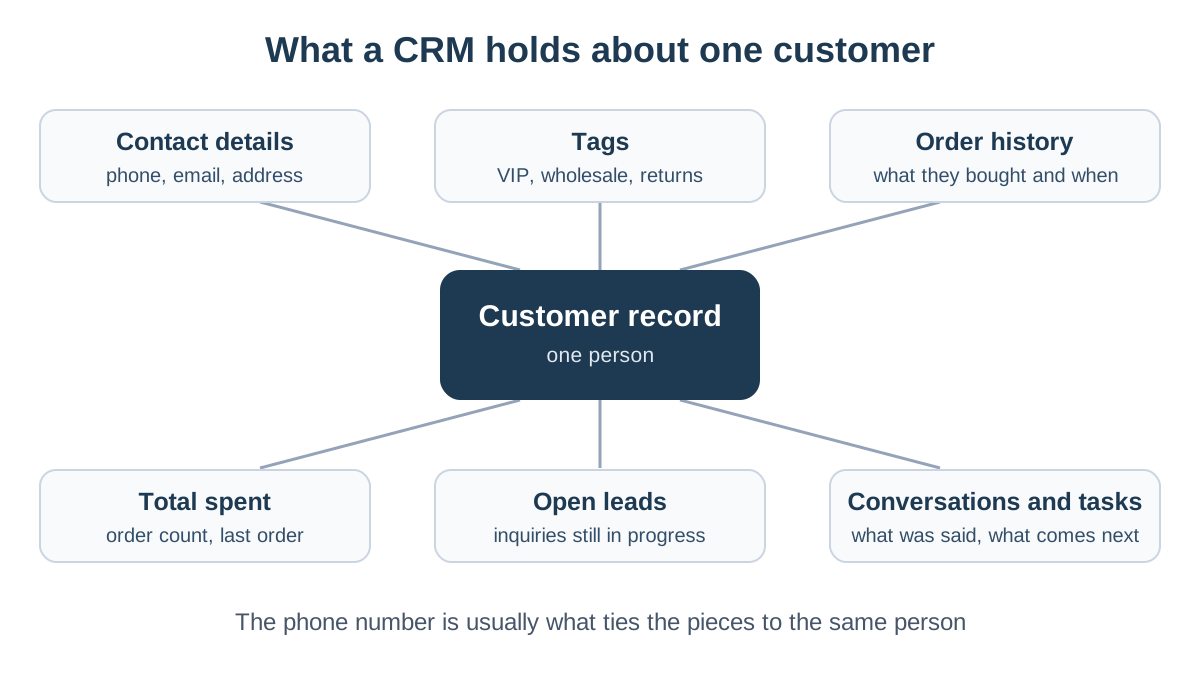
What data a CRM system holds
Every system defines it slightly differently, but the core is similar in almost all of them:
- Contact details. Name, phone, email and address. For stores that sell through messaging, the phone number is often the most important identifier, because it is how the customer writes on WhatsApp, places orders and fills in forms. A good system recognizes that the same number written with or without the country code belongs to the same person.
- Tags and segments. Labels such as "VIP", "wholesale" or "asked for a return" that let you see a group of customers and reach them. Tags only work if the team agrees on a short list in advance and uses it consistently.
- Purchase history. Every order, when it was placed, from which store and for how much. From this come the order count, the total spent and the date of the last order, the basis for customer lifetime value (LTV) and for spotting customers who stopped buying, known as churn.
- Leads and inquiries. People who have not bought yet but have shown interest, with the source they came from, their status and the estimated value of the deal.
- Conversations and notes. What was said, what was promised and what the customer asked for. This can be a simple notes field, a history of changes, or the conversations themselves, for example on WhatsApp.
- Tasks. What needs doing, who owns it and by when. "Get back to Dana with a price for ten units by Thursday" is a task, and without a place to record it, it gets forgotten.
Who enters the data
This is the question that decides whether a CRM is useful or empty:
- Data that arrives by itself, such as orders from the store and inquiries from a form, stays current.
- Data someone has to type, such as a call summary, depends on the team's discipline.
- The rule: the more information that flows in automatically from the systems you already use, the less discipline it takes for the CRM to be reliable.
Privacy and marketing consent
Contact details and purchase history are personal data. Privacy laws in most countries regulate how you collect, store and use them, and marketing messages by email, SMS or WhatsApp usually require the customer's prior consent. A few rules that help:
- Minimum data: keep only what you actually use.
- Access by role: not every employee needs to see all of it.
- Recorded consent: note when each customer agreed to hear from you.
For the rules that bind you, check the privacy regulator where you and your customers are, or ask a lawyer.
CRM vs ERP vs your store admin
The three terms come up in every conversation about business software and are often confused. The difference is the question each system was built to answer.
| Store admin | CRM | ERP | |
|---|---|---|---|
| Main question | What sold and what needs shipping | Who the customer is and what happens next | How the whole business runs |
| What it holds | Products, prices, orders, shipping | Contact details, tags, leads, history, tasks | Purchasing, suppliers, stock, finance |
| Who works in it | Whoever runs the store and fulfilment | Service, sales and the owners | Operations, purchasing and accounting |
| Examples | WooCommerce, Shopify | HubSpot, Zoho CRM, Pipedrive | SAP, NetSuite, Microsoft Dynamics |
- Your store admin keeps customers as part of orders. WooCommerce and Shopify both have a customer list with each customer's orders, and that is enough for one store where one person handles everything. What is usually missing is everything that happens before the purchase, such as an inquiry from a form or a question on WhatsApp, and a single view of a customer who bought from two stores.
- A CRM starts from the customer rather than the order. It also holds people who have not bought yet, and lets you follow them until they buy or close.
- An ERP, or enterprise resource planning system, runs the operational and financial side: purchase orders to suppliers, stock in warehouses, costs and accounting. In a manufacturer or a large importer the ERP is the heart of the business, and the CRM is one module beside it.
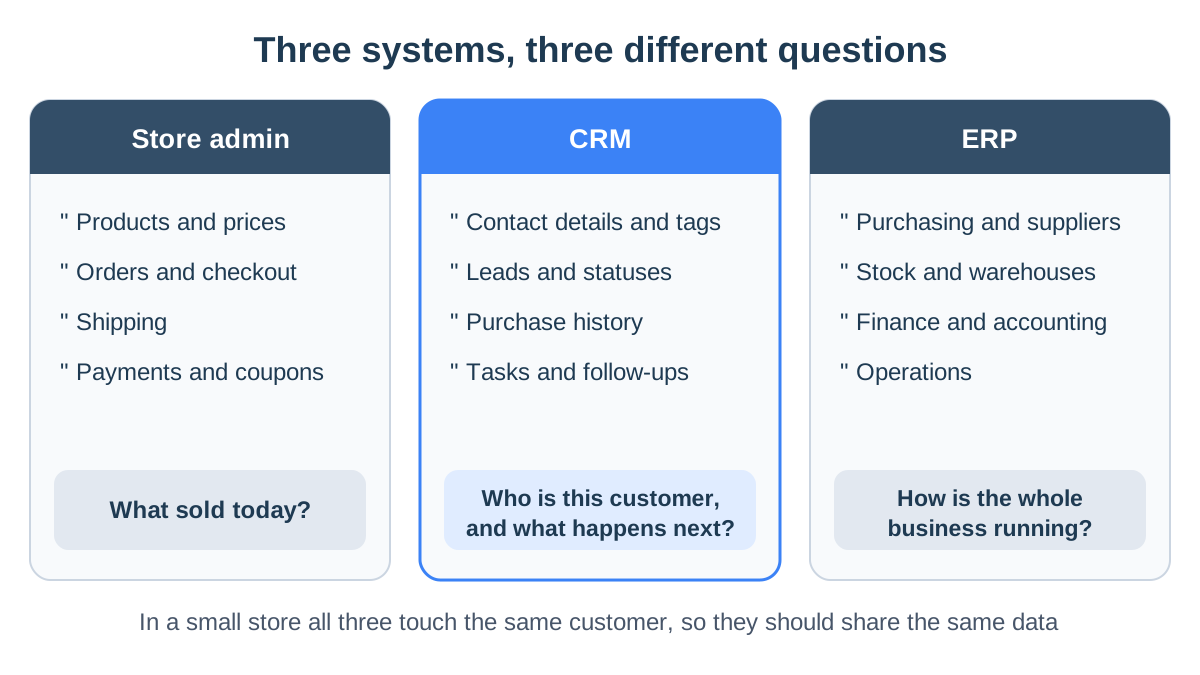
In a small or mid-sized online store the lines blur. The same customer appears in an order, in a WhatsApp chat and in the profit report. So the practical question is not which category to buy, but how to make every system see the same customer.
We cover the choice between one system that spans several areas and several connected tools in the guide to business management software.
Types of CRM
The usual split is by what the system does with the data:
- Operational CRM runs the daily work with customers: capturing leads from forms, moving them between statuses, customer records and automated messages. This is the type most small businesses need first.
- Analytical CRM reads the data that has built up: customer segments, lifetime value, churn and reports on where inquiries come from. It becomes useful once there is enough history for the numbers to mean something.
- Collaborative CRM makes sure the whole team sees the same picture: who spoke to the customer, what was agreed and who owns the next step. It is needed as soon as more than one person talks to the same customers.
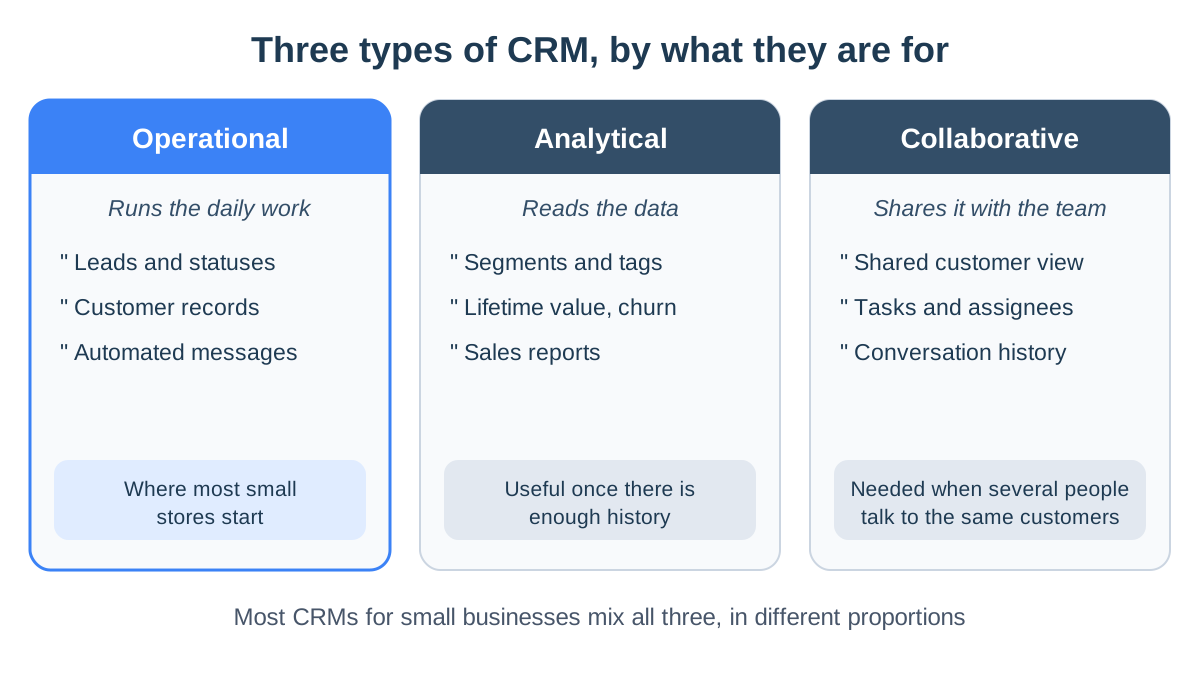
Most systems for small businesses combine all three in different proportions.
Other ways to classify CRM systems
- General or built for one industry. A general CRM is built around deals and salespeople, and suits service businesses and B2B sales with a long sales cycle. A CRM for an online store is built around orders, products and repeat customers.
- Cloud or installed. Almost every new system is a cloud service you open in the browser, on a monthly subscription. Installed systems are mostly found in large organizations.
- Standalone or part of a wider system. A CRM can be a separate product you connect to, or a module inside a system that also runs orders, stock and messaging.
Leads vs customers
A lead is someone who has shown interest and has not bought yet: they filled in a "contact me" form, left details in a campaign, asked for a quote on a large order or enquired about an event. A customer has already placed an order.
Many businesses mix the two in one list, and it is an expensive mistake. You handle them differently:
- A lead needs active follow-up. Someone has to get back to them, send an offer and check in again a few days later. Its value is an estimate, and it can close without a purchase.
- A customer needs service. Order updates, and a reason to return.
- One list hurts both. The warm leads drown among thousands of past customers, and nobody knows how many inquiries ended in a sale.
The path from lead to customer
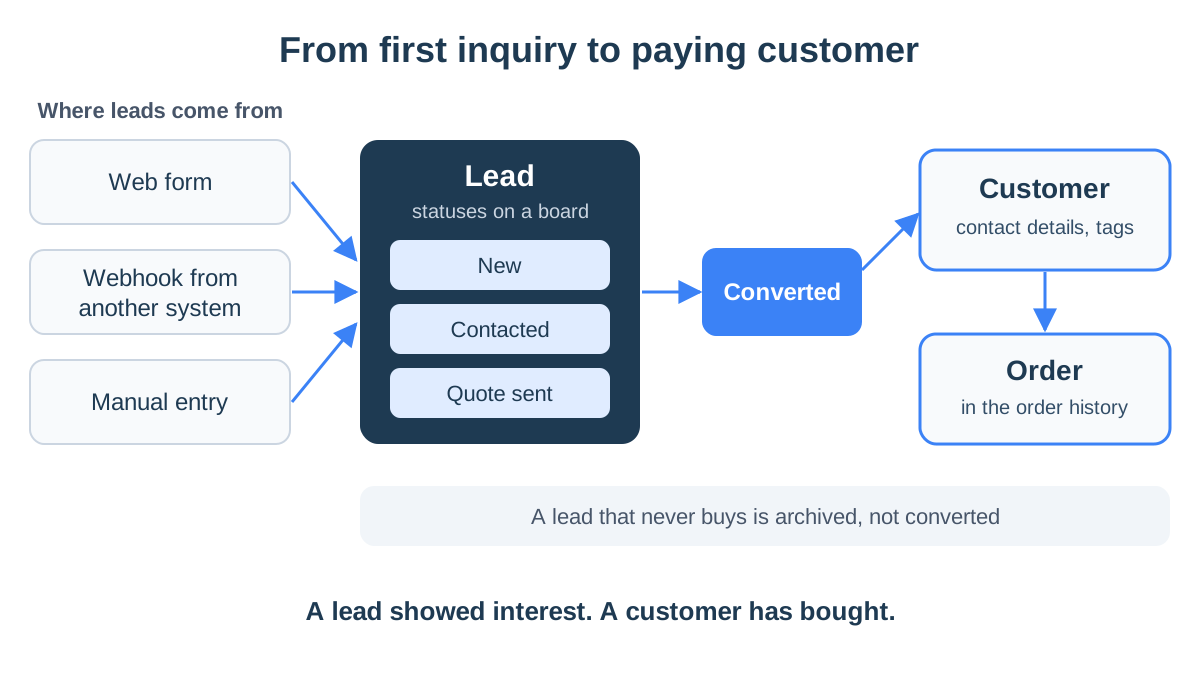
The usual path looks like this:
- Intake. The lead enters the system from its source, with contact details and what they asked for.
- Follow-up. The lead moves between statuses that describe your process, such as "New", "Contacted" and "Quote sent".
- Conversion. When the person buys, the lead is converted to a customer and the order is recorded under their name.
- Closing. A lead that did not buy is marked as such and archived, so the active list stays clean.
Example: a gift store with event orders
An online gift store sells mostly to individuals who buy on the website and pay right away. Once a week a different inquiry arrives: a company that wants two hundred holiday gift boxes, or a couple looking for favors for their wedding guests. That inquiry does not end at checkout:
- Someone asks about budget and date.
- The store sends a quote.
- It waits for approval, and sometimes sends a second quote.
- When the company approves, the lead becomes a customer and the order is recorded under its name.
If the inquiry only lives as a WhatsApp chat, it gets lost in a busy week. When it goes in as a lead with a status, an estimated value and the event date, the team sees every morning which quotes are waiting for an answer.
The split also makes measurement possible. When you know how many leads came from each source and how many became customers, you get the conversion rate of each source and know where to put your ad budget. How to build that process in practice, from lead sources to statuses, is covered in the guide to lead management.
CRM for small business: what to check
CRM feature lists are long, and most of it is irrelevant to a store run by three people. These are the questions to ask before you sign up:
- Does it connect to your store? A CRM that does not receive orders from WooCommerce or Shopify leaves purchase history outside, and that is the most important thing to know about a store's customer.
- How does it identify a customer? If the same person appears three times, once by email, once by phone and once under a different name, the data splits. Check whether the system matches people by phone number.
- Where do leads come in from? A website form, a connection from another system, or manual entry. If leads come from campaigns or automation tools, you need a way to send them in without copying by hand.
- Are the statuses yours? The sales process of a jewelry store is different from that of an office supplier. A system that forces fixed stages will make you work its way.
- What happens after a status change? Can the customer get an automatic message, for example on WhatsApp, when a new lead comes in or its status changes?
- How does the team work together? A personal login for each employee, permissions by role, and a place to record who owns what.
- What does it cost as you grow? Most systems charge per user. Work out what happens to the bill when two more people join, and what is included versus sold as an add-on.
- Language and layout. If your team works in more than one language, check that the interface and data display correctly in each.
The difference between a general CRM and what an online store needs, including what to bring over from the store and what to leave out, is covered in the guide to CRM for online stores. If you are weighing a well-known general system, the comparison StoreChart vs HubSpot shows where each one is strong.
Common mistakes when choosing a CRM
- Choosing by feature list. A system with a hundred features the team never opens is worth less than a spreadsheet everyone updates.
- Setting up before defining a process. First decide which statuses a lead has and who handles it, then configure the system.
- Importing everything. Ten years of contacts without marketing consent or history are noise, not an asset.
- Leaving the store out. A CRM that does not know what the customer bought makes your team ask questions the business already has the answers to.
The StoreChart CRM
StoreChart is a management system for online stores, so it approaches CRM from the store's side. Customers are built from orders, and leads and tasks live in the same system. Here is what it has, and what it does not.
Customer records built from orders
When you connect a WooCommerce or Shopify store, its customers and their orders come into StoreChart. In customer management you get:
- A customer record: contact details, tags, order history and charges.
- A customer list: each customer's order count, total spent and last order date.
- Search and export: search by name, phone or email, filter by store and export to a CSV file.
The customer record does not show an activity timeline or a button that opens a WhatsApp chat. The other direction does work: in the WhatsApp inbox, a panel beside the chat shows the contact's orders and open leads.
A Leads module with a status board
In the Leads module each lead source is a channel:
- Three kinds of channel: a website form with its own link, a webhook URL with a token that another system posts inquiries to, or manual entry.
- Fields per channel: such as "budget" or "event date", plus a default status.
- Statuses you set: each with a name and a color. Leads appear both in a table and on a board where you drag a lead from column to column.
- Lead details: an estimated value, notes and a history of the changes made to it.
- Link to the customer: a lead with a phone or email is linked to the customer record with the same details.
- Conversion: when it buys, you convert it to a customer, or to a customer plus a new order that opens with their details already filled in.
WhatsApp automations can send a message when a new lead comes in or when its status changes.
Tasks for the team
In the Tasks module you open a task with a title, description, assignee, due date and priority:
- Four states: To do, In progress, Blocked and Done.
- Views: each person sees their own tasks, the ones they assigned to others and the ones nobody has picked up yet, in a table or on a board.
- Comments: every task has a comment thread.
- Bell notifications: the assignee is notified in the in-app bell when a task is assigned to them, the person who asked for it is notified when it is done, and both are notified about new comments.
What's not included in StoreChart
So you know in advance:
- No lead scoring.
- One set of statuses, not several sales pipelines.
- No CSV import for leads, and no email marketing.
- The website AI chat does not create leads.
- A task is not linked to a specific lead or order.
- Notifications appear inside the app only, with no push notifications.
If those are exactly what your business needs, a dedicated CRM will fit better. The number of active leads and open tasks depends on your plan, and the details are on the pricing page.
Key takeaways
- Customer relationship management, or CRM, is a practice and a system for keeping everything the business knows about each customer and prospect in one place.
- The core of every CRM: contact details, tags, purchase history, leads, notes and tasks.
- The store admin runs orders, a CRM runs the customer relationship, and an ERP runs operations and finance.
- A lead has not bought yet; a customer has. Separating them lets you follow up and measure how many inquiries turn into sales.
- For an online store, the connection to orders and matching customers by phone matter more than a long feature list.
Frequently asked questions
What is the difference between a CRM and a customer spreadsheet?
A spreadsheet keeps one row per customer, but it does not update itself. A CRM receives new orders and inquiries automatically, shows each customer's history, and lets several people work on the same data without overwriting each other. Once more than one person talks to customers, the difference shows quickly.
Does a small online store need a CRM?
Not always a separate one. The WooCommerce or Shopify admin already keeps customers and their orders. A CRM becomes necessary when inquiries arrive before a purchase, when several people answer customers, or when you run more than one store and the same customer appears in several places.
What is the difference between a CRM and an ERP?
A CRM is about the relationship with the customer: who they are, what they bought, what they asked and what happens next. An ERP runs the operations of the whole business: purchasing, stock, finance and accounting. In small businesses the two categories overlap, and many systems offer part of each.
What is the difference between a lead and a customer?
A lead is someone who has shown interest, for example by filling in a form or asking for a quote, and has not bought yet. A customer has already placed an order. The split matters because you handle them differently: a lead needs follow-up until it buys or closes, and a customer needs service and a reason to come back.
Is StoreChart a CRM?
It covers what an online store needs from a CRM: customer records built from the orders of your connected stores, a Leads module with a status board and conversion to a customer, and a Tasks module for the team. It has no lead scoring, no multiple sales pipelines and no email marketing, so a large B2B sales team will find less than it needs.
How much does a CRM cost?
It varies widely between vendors. Most CRMs charge a monthly subscription per user, and some have a limited free tier. Work out the cost for the number of people on your team, and check whether the connection to your store and to WhatsApp is included or costs extra.