
Almost every tool an online store uses now promises "AI": the store platform, the email marketing app, the website chat, even the bookkeeping software. Some of those promises are real and save hours every week; others are a new label on an old feature. This guide to AI for business is for store owners who want to know where it actually helps today: customer service in website chat and on WhatsApp, product recommendations, reading supplier invoices, and content. It also covers where AI still falls short, what it costs, the main risks, and a sensible way to start small. Finally, it shows how StoreChart uses AI and what its tools do not do.
What is AI for business
When people talk about AI for business today, they usually mean generative AI: large language models like the ones behind ChatGPT, Gemini and Claude. A model like this reads text, and sometimes an image or a PDF, and writes an answer in natural language.
It does not look facts up in a database the way regular software does. It predicts which text should come next, based on the enormous amount of text it learned from and on whatever you gave it in the conversation.
AI vs regular software
That difference explains almost every AI success and failure in a business:
- Regular software: does exactly what it was programmed to do. If a product costs $49, it shows $49.
- A language model: writes a plausible answer. If the real price is not in front of it, it may write a price that sounds right and does not exist.
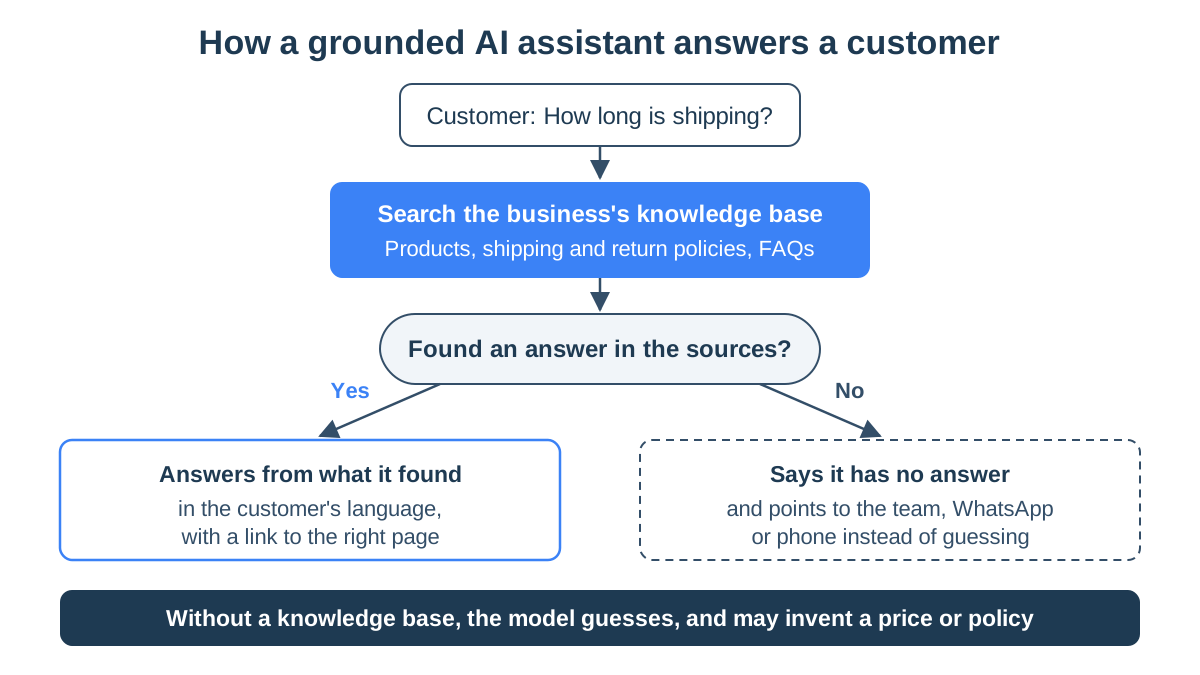
- The first rule: give the model the right information, and ask it to answer only from that.
Grounding: answers from your own data
Answering only from the business's information is called grounding. It works in three steps:
- The system searches the business's knowledge base for the passages that match the question.
- It hands those passages to the model, together with the question.
- The model writes its answer from those passages only.
Three uses of AI in an online store
For an online store, the practical uses fall into three families:
- Talking to customers. A chatbot on your website, an agent on WhatsApp, and product recommendations inside the conversation.
- Reading documents. Supplier invoices, receipts and files that arrive by email.
- Writing and translating. Product descriptions, translating a catalog into another language, and wording for replies.
AI vs business intelligence
Keep all of this separate from business intelligence (BI), which gets confused with AI because of the name:
- Business intelligence: dashboards and reports that show what happened in the business, such as sales, profit and stock. It rests on exact calculation, not on writing.
- AI: reads, sorts and writes.
- When to use which: when you ask "how much profit did I make last month", you want a calculation, not a well-phrased guess.
AI for ecommerce: five practical uses
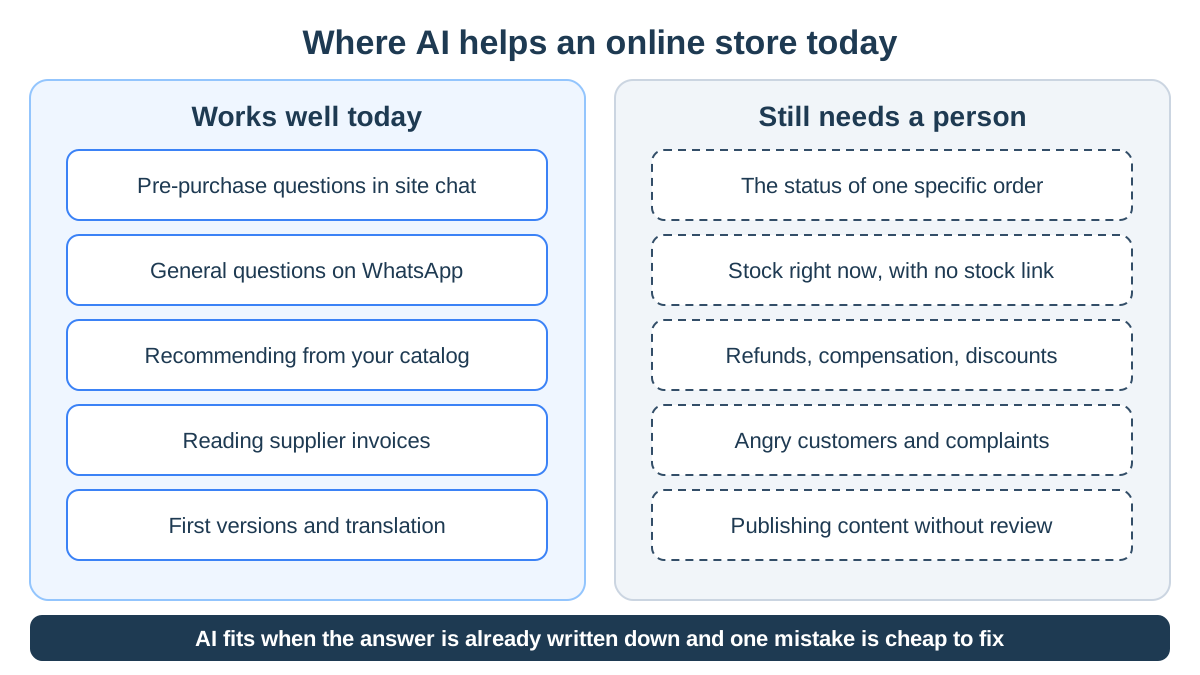
AI already saves work in five places in an online store. Each has a limit worth knowing.
AI chat on your store's website
Most questions a store gets before a purchase repeat:
- Shipping: how much it costs and how long it takes.
- Returns: how to return or exchange an item.
- Fit: which size to pick, and whether the product works for a particular use.
An AI chatbot connected to your site's content answers them in the language the customer wrote in, at ten at night. This is where AI pays off fastest, because the answers are already written on your site, just scattered across different pages. How to choose a tool like this and what to prepare is covered in the guide to choosing a chatbot for your website.
An AI agent on WhatsApp Business
In many markets, a large share of customer messages arrive on WhatsApp rather than on the website. An AI agent connected to the business number through the WhatsApp Business API answers inside the chat:
- Before and after the purchase: a size exchange, a delivery question, a request for an invoice.
- Free text: the customer writes with typos and two questions in one message, and the agent still understands. That is the difference from an old menu bot.
- A split of work: the agent answers the general questions, and the team handles the ones that need checking.
The difference between menu bots and AI agents is covered in the WhatsApp bot guide. Customer service across channels is covered in the guide to AI customer service for online stores.
Product recommendations in chat
A customer who types "I need a gift for my dad, he loves cooking, under $80" will not find the answer in your site's filters. A language model that knows your catalog can help in three steps:
- It asks one or two questions to understand what the customer needs.
- It recommends a specific product and says why.
- It adds a link to the product page.
A recommendation is only as good as the product descriptions behind it: if the description never says the pan works on induction, the AI does not know it either.
Reading supplier invoices
Every month, invoices arrive by email from suppliers, the payment processor, the shipping company and the ad platforms, each in its own layout. Models that read PDFs and images now do this well:
- Recognition: they tell an invoice apart from a quote.
- Extraction: vendor, tax ID, amount, tax, date and document number.
- No templates: unlike older text recognition, you do not set up a template per vendor.
Product descriptions and translation
Here AI saves you the blank page, not the responsibility:
- A first draft: a language model writes a first version of a product description, or reworks a supplier's text.
- Translation: it translates a catalog into another language faster than a translator can.
- Editing: a description written without the real product data will invent sizes and materials. A machine translation needs a native speaker's eye before it goes live.
| Task | What AI does well | What stays with you |
|---|---|---|
| Pre-purchase questions on your site | Answers shipping, returns and spec questions from your site's content | Keeping that content correct and current |
| WhatsApp messages | Answers general questions in the customer's language, even after hours | A specific order, refunds and complaints |
| Product recommendations | Asks what the customer needs and recommends from your catalog | Complete product descriptions, and hiding sold-out items |
| Supplier invoices | Recognizes an invoice and pulls out vendor, amount, tax and date | Reviewing before it goes to your accountant |
| Content and translation | A first version and a fast translation | Editing, accurate data and your brand's tone |
When AI is the wrong tool
This part prevents most of the expensive mistakes. Keep a person in charge here, or at least do not rely on AI alone:
- Live data it cannot see. "Where is my order?" and "Do you have this in a medium?" change by the hour and belong to one customer. If the tool is not actually connected to your order system and stock, it cannot know, and a good tool says so instead of guessing.
- Decisions about money. A refund, compensation, an unusual discount or a price change. Language models tend to agree with whoever they are talking to, which is exactly what you do not want when a customer asks for a credit.
- Angry customers and sensitive cases. A damaged product, a lost parcel or an unusual request. An upset customer wants to know that a person read their message.
- Legal, tax and accounting calls. AI can sort invoices and summarize a document. Deciding what is deductible or what your terms of service say stays with a professional.
- Content published without review. Product descriptions, return policies and landing pages published unedited are a steady source of errors, and of copy that sounds like every other store.
- One tool that promises everything. The more a tool promises, the harder you should look at what it actually does. Ask to see it answer your customers' real questions, not a prepared demo.
A simple rule of thumb:
- AI fits when the answer is already written down somewhere, and a single mistake is cheap and easy to fix.
- AI fits poorly when the answer needs live data or judgment, and a mistake costs money or a customer.
AI costs and risks
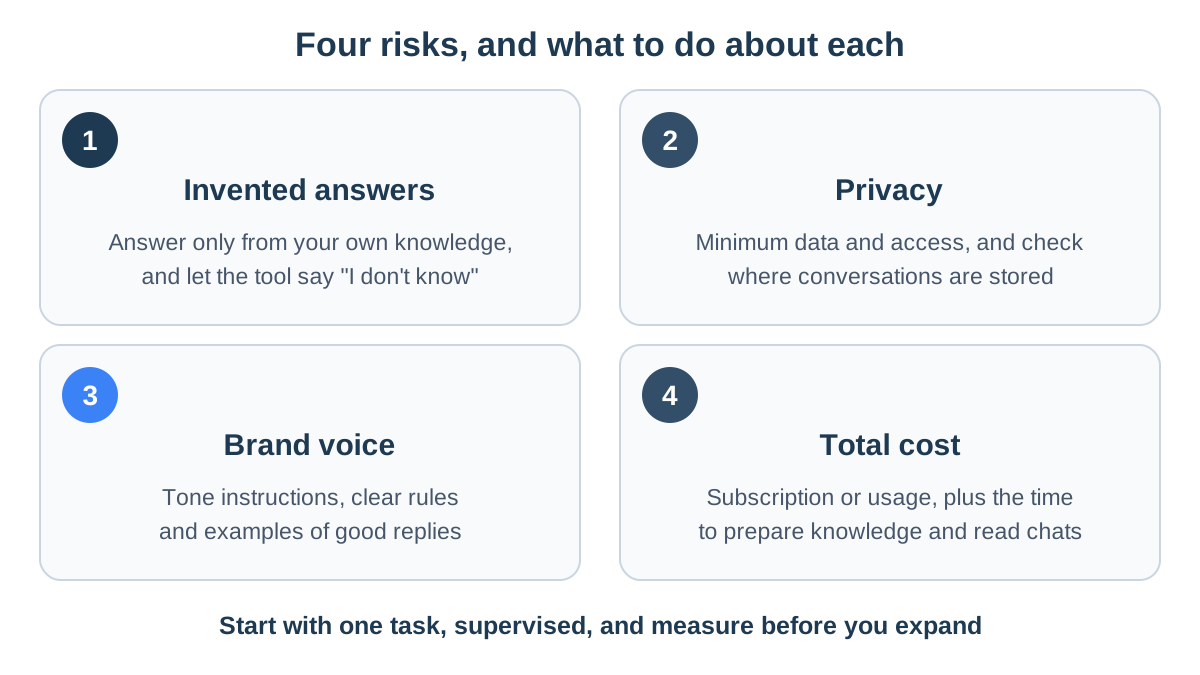
How much AI costs a business
AI tools for businesses are priced in three main ways, sometimes combined:
- A flat monthly subscription, often with a cap on conversations or messages.
- A fee per conversation, or per conversation resolved without a person.
- A fee per usage, meaning the amount of text the model reads and writes.
The price on the plan page is only part of the picture. Add:
- Preparing the knowledge: policies, FAQs and product details.
- Reading conversations: the time spent checking and correcting answers.
- WhatsApp template messages: Meta charges for them. Replies sent within 24 hours of the customer's last message are not charged, so an agent that answers incoming messages usually adds no message cost.
Invented answers (hallucinations)
A language model that cannot find an answer tends to write something that sounds right. The field calls this a "hallucination".
In February 2024, British Columbia's Civil Resolution Tribunal ordered Air Canada to honor a refund policy that the chatbot on its website had made up. The airline's argument that the chatbot was responsible for its own words was rejected. The lesson for a store: what your chat tells a customer, your business told the customer.
How to reduce the risk:
- Answer only from the business's own knowledge, not from the model's general knowledge.
- Let the tool say "I don't know" and point to a person, rather than guess.
- Check the figures. A price, size, delivery time or link must appear in a source the tool actually read.
- Test with real questions from last month's WhatsApp and email, typos and slang included.
Privacy and customer data
A customer conversation often includes a name, phone number, address and order details, and privacy law applies to it like any other customer record. The rules depend on where you and your customers are: the GDPR in the European Union, Israel's Protection of Privacy Law (whose Amendment 13 took effect in August 2025), and a growing number of US state privacy laws. This is not legal advice, but a few simple rules help everywhere:
- No lists in public tools: never paste customer lists, phone numbers or order details into a public chat tool.
- Questions for the vendor: ask where data is stored, who can see it, and whether it is used to train models.
- Minimum access: an email connection used to collect invoices needs read-only access.
- No sensitive details in chat: do not ask customers for card numbers or ID numbers.
- Transparency: tell customers they are talking to an automated assistant. It is fair, and it sets expectations.
For the binding details, check your privacy regulator's guidance and ask a lawyer when in doubt.
Brand voice
Without instructions, a language model writes in a polite, generic tone that sounds like every other business. If your store talks casually, with humor, or in expert language, you have to tell the tool so:
- Tone instructions: how you talk to customers.
- Rules: "never promise a delivery date", "never offer a discount code".
- Examples: good replies you have already written.
Good tools answer in the language the customer wrote in, and let you set a name, a welcome message and your own rules.
AI for small business: how to start
The safe route is to start with one task, measure it, and only then expand:
- Pick one task that hurts. Go through last month's WhatsApp and email conversations and count which questions come up most. If half are about shipping and returns, start with customer service. If the pain is a pile of invoices at month end, start there.
- Gather the answers you already have. Shipping and return policies, FAQs, product descriptions and opening hours. What is not written down, the AI does not know.
- Write down what is off limits. Promises nobody may make, topics that always go to a person, and wording that does not sound like you.
- Start supervised. In the first weeks, read every conversation, or use a mode where the tool stops as soon as someone from your team joins the chat.
- Measure. How many questions went unanswered, how many chats were passed to the team, which answers customers complained about, and what happened to sales from chat.
- Expand gradually. Add another channel or task only once the first one works.
Six questions for an AI vendor
Ask these before you buy:
- Where do the answers come from, and can I see and edit that source?
- What does the tool do when it has no answer?
- How does a conversation reach a person, and who receives it?
- Does it read orders and stock in real time, or not?
- Where are conversations stored, and who can see them?
- How is the price calculated, and what happens when I pass the cap?
StoreChart's AI tools
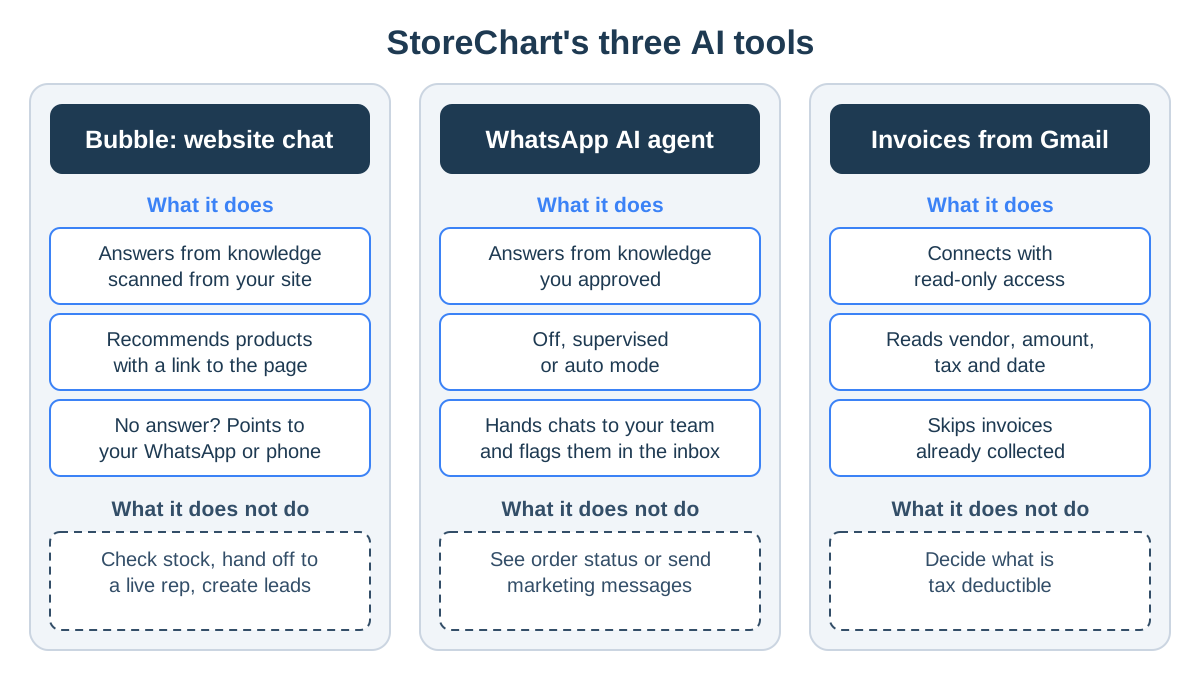
StoreChart has three AI tools and one translation feature. Each is built around the same principle: answer and read from the business's own information, and say plainly what it does not know.
Bubble: AI chat for your website
Bubble is a chat window you install on your site with one line of code:
- Knowledge from a site scan: a scan of up to about 250 pages extracts products, articles and FAQs. You complete it with a business profile and rules you write.
- Control over the knowledge: every item in the knowledge base can be edited or switched off.
- The visitor's language: Bubble replies in the language the visitor writes in.
- Recommendations: it recommends products from the scanned catalog, with a link to the product page.
- When there is no answer: it says so and points the visitor to your store's WhatsApp or phone, whichever you set in the profile.
Know its limits too:
- No stock check: it does not check live stock, so switch off products that are sold out for a while.
- No handoff: it does not hand the chat to a live rep.
- No orders or leads: it does not see customers' orders and does not create leads. Managing inquiries and leads is a job for a CRM.
The WhatsApp AI agent
The WhatsApp AI agent replies to customers from the same shared WhatsApp inbox your team works in. Its knowledge comes from a scan of your site, answers extracted from your past chats that you approved, and content you add.
- Language and voice notes: it replies in the customer's language and transcribes voice notes.
- The 24-hour window: it replies only within 24 hours of the customer's last message.
- A mode per conversation: off, supervised, where the agent replies until someone from your team writes in that chat, or auto.
- Handoff to the team: when a customer asks about their specific order or about stock right now, the agent says it has no access to that data and passes the chat to the team. The conversation is flagged in the inbox as needing attention.
- Settings: handoff keywords, a minimum confidence level, working hours, and what happens when there is no answer: a fallback message or silence.
- Knowledge gaps: questions it could not answer are saved for you to fill.
Reading invoices from Gmail
For invoice collection, you connect a Gmail account with read-only access. From there it works like this:
- StoreChart collects invoices on the schedule you set: daily, weekly or monthly.
- The AI tells an invoice apart from a quote or an order confirmation.
- It reads the vendor, tax ID, amount, tax, date and document number from each invoice, even when it arrives as an image.
- Each expense gets a category, and invoices already collected are skipped.
- Once you have reviewed the list, it goes to your accountant on the day of the month you chose.
Catalog translation and what's not included
In the settings of the product content manager, you can use AI to translate product names, descriptions and categories into another language, one language at a time. Have a native speaker review it before you publish.
All AI usage is metered at the account level, and a tab in your settings shows how much has been used. And what StoreChart does not do with AI:
- Prices: it does not set prices.
- Proactive marketing: the WhatsApp agent does not send marketing messages on its own.
- Reports: the numbers on your business intelligence dashboards are calculated directly from your data, not written by a model.
Key takeaways
- AI for business works best on repetitive tasks whose answers are already written down: customer questions, catalog recommendations, invoices and translation.
- Live data, money and angry customers stay with a person, or at least under a person's supervision.
- The real cost includes the time to prepare knowledge and read conversations, not just the subscription.
- A good tool answers only from your business's information, says when it does not know, and shows you every conversation.
- Start with one task, supervised, measure it, and only then expand.
Frequently asked questions
Is AI worth it for a small business?
Yes, and sometimes more than for a large one. Without a support team, a website chat or a WhatsApp agent that answers shipping and returns questions gives the owner back the hours spent typing the same answer again and again. Start with one task rather than several tools at once.
How much does it cost to add AI to an online store?
It depends on how the tool is priced: a monthly subscription, a fee per conversation, or a fee per usage. On top of that comes your own time to prepare the knowledge and review answers, and on WhatsApp the template fees Meta charges. Compare the twelve-month total, not the price on the plan page.
Can an AI chatbot replace a customer service rep?
Not entirely. It can answer most general questions, such as delivery times, return policy and product specs, which frees a person for the conversations that need checking. Refunds, complaints and a specific customer's order stay with a human.
Is it safe to put customer data into an AI tool?
Only carefully, and only what the task needs. Privacy law applies to chat logs and customer records, so check where a tool stores data, who can see it and whether it is used to train models. Never paste customer lists into a public chat tool, and ask a lawyer when in doubt.
What should I do when the AI gives a customer a wrong answer?
Fix the source, not just the conversation. A wrong answer usually comes from missing or outdated information in the knowledge base, so update the entry, check that nothing contradicts it, and reply to the customer yourself. Review conversations regularly, especially in the first weeks.
What does StoreChart's website chat not do?
It does not check stock or hand off to a live rep. Bubble answers from the knowledge base built by scanning your site and recommends products from the scanned catalog without a live stock check, so switch off products that are sold out. When it has no answer, it points the visitor to your WhatsApp or phone.